Manifest文件介绍
官方文档
https://gerrit.googlesource.com/git-repo/+/master/docs/manifest-format.md
一、前言:
repo用于管理多个git项目,同一产品可能包含多个git项目,不同的git项目集合,可能形成不同产品,通过repo可以实现方便的管理。
那么repo如何管理多个git项目的呢?管理的git项目的配置信息都存放在什么地方呢?
是通过一个manifest文件配置的。
二、manifest文件分析
<?xml version="1.0" encoding="UTF-8"?>
<manifest>
  <remote fetch="ssh://username_placeholder@git.mioffice.cn:29418/" pushurl="ssh://username_placeholder@gerrit.pt.mioffice.cn:29418/" name="miui" review="gerrit.pt.mioffice.cn" />
  <remote fetch="ssh://username_placeholder@bsp.slave.xiaomi.srv:29418/" name="generated" review="gerrit.bsp.xiaomi.srv"/>

  <default remote="miui" revision="master-t-mtk" sync-c="true"/>

  <!-- mtk ssi projects -->
  <include name="mtk/ssi/mssi_t.xml" />

  <!-- xiaomi shared ssi/vendor projects -->
  <remove-project name="alps/vendor/mediatek/proprietary/packages/apps/Dialer" />

  <!-- ssi build reference -->
  <project name="alps/vendor/mediatek/proprietary/hardware/audio" path="vendor/mediatek/proprietary/hardware/audio" groups="mtk-vendor,mtk-vnd-codebase" />

  <project name="platform/build/soong" path="build/soong">
    <linkfile dest="Android.bp" src="root.bp"/>
    <linkfile dest="bootstrap.bash" src="bootstrap.bash"/>
  </project>

</manifest>-
manifest
-
remote
name:在每一个.git/config文件的remote项中用到这个name,即表示每个git的远程服务器的名字(这个名字很关键,如果多个remote属性的话,default属性中需要指定default remote)。git pull、git fetch的时候会用到这个remote name。
fetch:下载代码的真正路径的前缀,在这个前缀后面加上对应的仓库名就是完整的真正下载路径
pushurl:上传代码的真正路径的前缀,在这个前缀后面加上对应的仓库名就是完整的上传代码的真正路径,对应gerrit服务器域名与 review一致;若不配置则和fetch路径一致
review:指定Gerrit的服务器名,用于repo upload操作。如果没有指定,则repo upload没有效果
-
default
设定所有projects的默认属性值,如果在project元素里没有指定一个属性,则使用default元素的属性值。
remote:远程服务器的名字,若存在多个remote的时候需要指定default remote
revision:所有git仓库的默认branch,后面project没有特殊指出revision的话,就用这个branch
sync_c:如果设置为true,则只同步指定的分支(revision 属性指定),而不是所有的ref内容
-
project
需要clone的单独git
name:git 的名称,用于生成git url。URL格式是:{project name}.git 其中的 fetch就是上面提到的remote 中的fetch元素,name 就是此处的name
path:clone到本地的git的工作目录,如果没有配置的话,跟name一样
remote:定义remote name,如果没有定义的话就用default中定义的remote name
revision:指定需要获取的git提交点,可以定义成固定的branch,或者是明确的commit 哈希值
groups:指该project所属的组,设置的话以空格或者逗号分隔多个组名。所有的project都自动属于”all”组
upstream:在哪个git分支可以找到一个SHA1。用于同步revision锁定的manifest(静态manifest文件)。该模式可以避免同步对应仓库的整个分支空间
-
linkfile
用于创建软连接文件,是<project>标签的子元素,需要写在<project>与</project>之间
dest属性:软链接生成的路径
src属性:软链接链接的文件所在路径
-
include
通过name属性可以引入另外一个manifest文件(路径相对与当前的manifest.xml 的路径)
name:另一个需要导入的manifest文件名字
可以在当前的路径下添加一个another_manifest.xml,这样可以在另一个xml中添加或删除project
-
remove-project
从内部的manifest表中删除指定的project。经常用于本地的manifest文件,用户可以替换一个project的定义
三、实践
repo命令的使用格式如下所示:
**$ repo <COMMAND> <OPTIONS>**
可选的的有:help、init、sync、upload、diff、download、forall、prune、start、status,每一个命令都有实际的使用场景, 下面我们先对这些命令做一个简要的介绍:
-
init
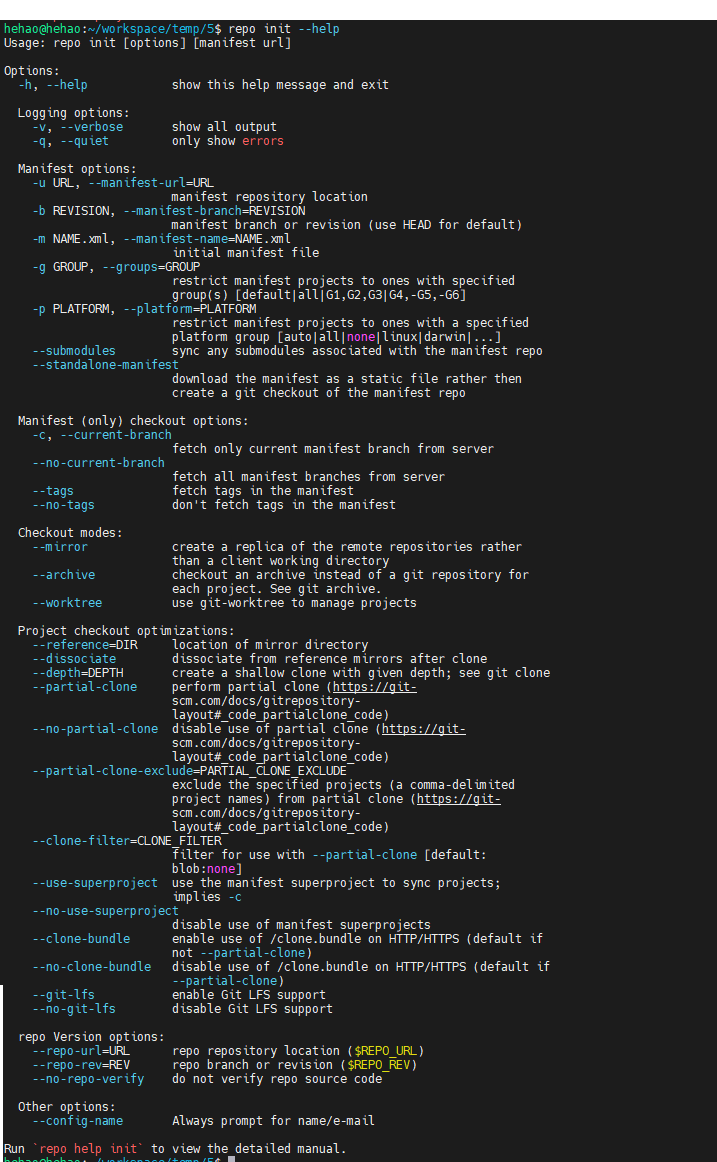
repo init -u url [options]
hehao@hehao:~/workspace/temp/5$ repo init -u ssh://hehao@git.mioffice.cn:29418/platform/manifest.git -b dev -m bsp-8350-t.xml --repo-url=ssh://hehao@git.mioffice.cn:29418/tools/repo.git
remote: Counting objects: 2, done
remote: Total 7180 (delta 0), reused 7180 (delta 0)
repo: warning: verification of repo code has been disabled;
repo will not be able to verify the integrity of itself.

Downloading manifest from ssh://hehao@git.mioffice.cn:29418/platform/manifest.git
remote: Counting objects: 260, done
remote: Finding sources: 100% (260/260)
remote: Total 260 (delta 40), reused 223 (delta 40)

Your identity is: hehao <hehao@xiaomi.com>
If you want to change this, please re-run 'repo init' with --config-name

repo has been initialized in /home/hehao/workspace/temp/5
在当前目录中安装 Repo。这样会创建一个 .repo/ 目录,其中包含存放 Repo 源代码和标准 Android 清单文件的 Git 代码库。
常用的几个选项:
-u:指定manifest文件所在的网址。
-m:选择代码库中的清单文件。如果未选择清单名称,则默认为 default.xml。
-b:指定修订版本,即特定的 manifest-branch。注意,这个分支是manifst文件所在仓库的分支,并不是repo管理的项目git的分支。
--repo-url=URL:repo 工具本身的 git库地址。小米有对此做定制,小米内部对应路径为 --repo-url=``ssh://hehao@git.mioffice.cn:29418/tools/repo.git。
--repo-branch=REVISION:使用 repo 的版本库,即 repo git 库的分支或者里程碑名称。默认值 stable
注意:对于所有剩余的 repo 命令,当前的工作目录必须是 .repo/ 的父目录或该父目录的子目录。-u和-m组合起来,就精确到manifest文件的git路径
该命令执行之后会生成一个.repo的文件夹,文件夹中的内容如下:
hehao@hehao:~/workspace/temp/5$ ll .repo/
total 36
drwxrwxr-x  5 hehao hehao  4096 9月  23 23:01 ./
drwxrwxr-x  5 hehao hehao  4096 9月  23 23:01 ../
drwxrwxr-x  2 hehao hehao 16384 9月  23 23:01 manifests/
drwxrwxr-x  8 hehao hehao  4096 9月  23 23:01 manifests.git/
-rw-rw-r--  1 hehao hehao   503 9月  23 23:01 manifest.xml
drwxrwxr-x 11 hehao hehao  4096 9月  23 23:01 repo/
具体解释如下:
repo/manifests.git:此为repo配置信息的git库,不同版本包含不同配置信息。
repo/manifests:此为repo配置信息的工作目录,其中包含或多个xml文件描述的配置。每个xml文件是独立的一套配置,配置内容包括当前repo工作目录包含哪些git项目、所有git项目所处的默认公共分支、以及远端地址等。
repo/manifest.xml:repo工作目录中的内容同一时刻只能采用manifests中的一个xml文件做为其配置,该文件是一个实体文件,直接引用 .repo/manifests 文件夹下的真实文件。
repo/repo:此为repo脚本集的git库,用于repo管理所需的各种脚本,repo的所有子命令就是其中的对应脚本实现。
-
sync
$ repo sync [PROJECT_LIST]
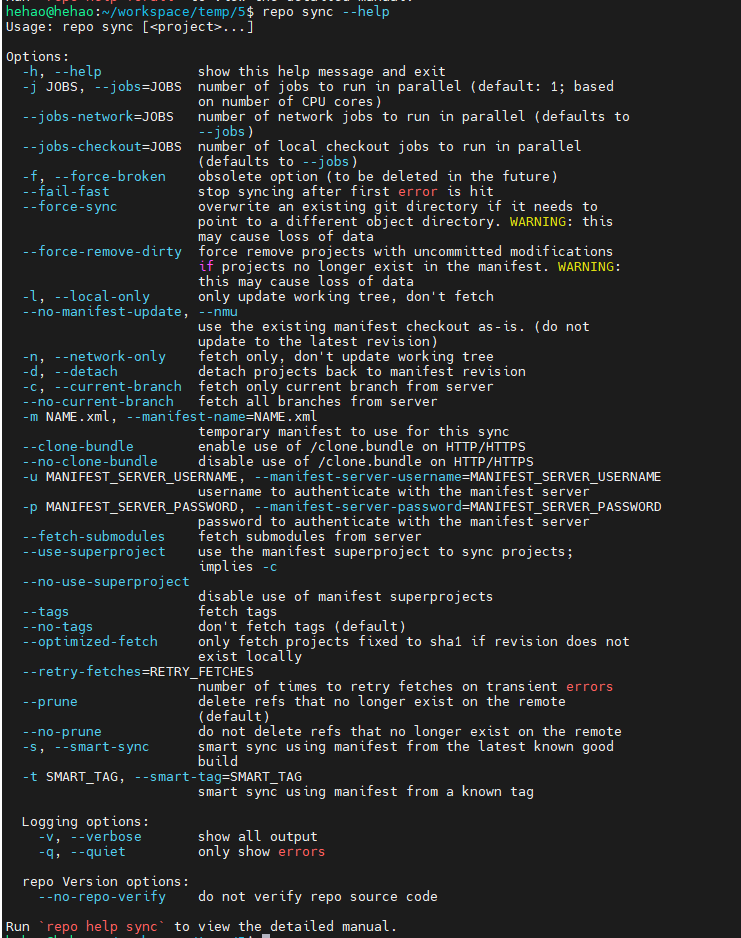
下载远程代码,并将本地代码更新到最新,这个过程称为“同步”。如果不使用任何参数,那么会对所有repo管理的进行同步操作:
当本地的git库是第一次触发同步操作时,那么,该命令等价于git clone,会将远程git库直接拷贝到本地
当本地已经触发过同步操作时,那么,该命令等价于git remote update && git rebase origin/
也就是说,多出了一个projects目录,和.repo外面的许多目录,具体内容如下:
(*).repo/projects:此为repo所管理的所有git项目集,包含repo当前配置所指定的所有git项目对应的git目录。不同的清单文件(即manifest.xml)内容,指定不同的git项目集组合,表征不同的项目版本或者项目。
().repo/../*:此为repo的工作区。
当sync命令正确执行完毕后,本地代码就同远程代码保持一致了。在一些场景下,我们会用到sync命令的一些参数:
hehao@hehao:~/workspace/temp/5$ repo sync -j4 -dc -f
warning: -f/--force-broken is now the default behavior, and the options are deprecated
remote: Total 0 (delta 0), reused 0 (delta 0)
Fetching: 100% (4/4), done in 4.340s
Garbage collecting: 100% (4/4), done in 0.028s
Checking out: 100% (4/4), done in 1.125s
repo sync has finished successfully.
**-j:**开启多线程同步操作,这会加快sync命令的执行速度。默认情况下,使用4个线程并发进行sync
-c : –current-branch:只同步指定的远程分支。默认情况下,sync会同步所有的远程分支,当远程分支比较多的时候,下载的代码量就大。使用该参数,可以缩减下载时间,节省本地磁盘空间
-d : –detach:脱离当前的本地分支,切换到manifest.xml中设定的分支。在实际操作中,这个参数很有用,当我们第一次sync完代码后,往往会切换到dev分支进行开发。如果不带该参数使用sync, 则会触发本地的dev分支与manifest设定的远程分支进行合并,这会很可能会导致sync失败
-f : –force-broken:当有git库sync失败了,不中断整个同步操作,继续同步其他的git库
-
forallmanifest
$ repo forall [PROJECT_LIST] -c <COMMON>
repo forall可以遍历每个repo仓库并执行同样的命令
hehao@hehao:~/workspace/temp/5$ repo forall -c 'echo ======$REPO_PROJECT======; git remote -v'
======abl/tianocore/edk2======
miui    ssh://hehao@git.mioffice.cn:29418/abl/tianocore/edk2 (fetch)
miui    ssh://hehao@gerrit.pt.mioffice.cn:29418//abl/tianocore/edk2 (push)
======platform/external/bouncycastle======
miui    ssh://hehao@git.mioffice.cn:29418/platform/external/bouncycastle (fetch)
miui    ssh://hehao@gerrit.pt.mioffice.cn:29418//platform/external/bouncycastle (push)
======platform/external/ntfs-3g======
miui    ssh://hehao@git.mioffice.cn:29418/platform/external/ntfs-3g (fetch)
miui    ssh://hehao@gerrit.pt.mioffice.cn:29418//platform/external/ntfs-3g (push)
======platform/vendor/microsoft/exfat======
miui    ssh://hehao@git.mioffice.cn:29418/platform/vendor/microsoft/exfat (fetch)
miui    ssh://hehao@gerrit.pt.mioffice.cn:29418//platform/vendor/microsoft/exfat (push)
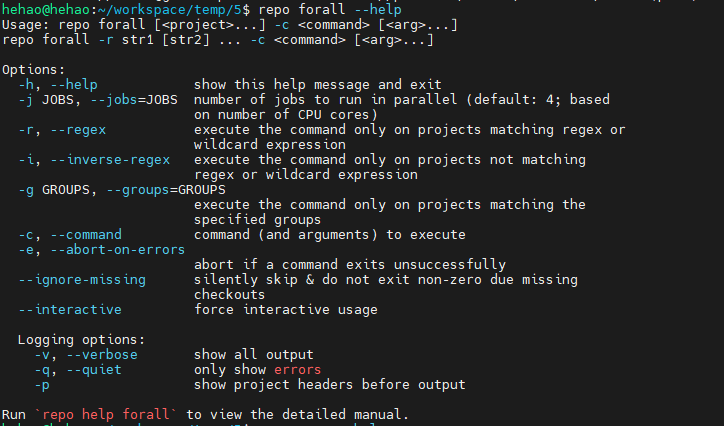
在每个项目中运行指定的 shell 命令。通过 repo forall 可使用下列额外的环境变量:
REPO_PROJECT 可设为项目的具有唯一性的名称,对应仓库名。
REPO_PATH 是客户端根目录的相对路径。对应仓库路径。
REPO_REMOTE 是清单中远程系统的名称,对应远程服务器名。
REPO_LREV 是清单中修订版本的名称,对应的仓库当前提交哈希值。
REPO_RREV 是清单中修订版本的名称,对应的仓库当前所在分支,与manifest文件中定义一致。