toucheventcheck 内存破坏问题分析解决复盘
问题背景
| JIRA | BUGOS2-253908, BUGO82-7770 |
|---|---|
| 问题简述 | toucheventcheck NE |
| 问题来源 | MQS大数据打点 |
| 复现版本 | 多个8650升V项目的首个外发版本,包括:OS2.0.6.0.VNBCNXM, OS2.0.6.0.VNCCNXM, OS2.0.6.0.VNACNXM,OS2.0.2.0.VOZCNXM等 |
| 复现机型 | N1/N2/N3/O82等多机型 |
| 复现概率 | 高概率,单问题****Fail Rate 7%+ |
| 严重性 | 8650升V外发****MQS Top 1问题。24年制定了升级维护项目不衰退OKR,整机Fail Rate低于3%。单这一个问题就远远超过3%。N1/N2/N3三个机型该问题的Fail Rate分别为6.9%,8.35%, 9.17% |
| 难点 | 虽然外发概率高,但内部仍然难以复现 |
| fix patch | https://gerrit.pt.mioffice.cn/q/I663c3406a03cbf82fa81c50897ec23925625fe22 |
附11.27日该问题的Fail Rate数据:
| project | date_version | 活跃设备数 | 异常设备数 | 异常设备率 |
|---|---|---|---|---|
| N3 | 20241108-OS2.0.6.0.VNCCNXM | 1129091 | 103485 | 9.17% |
| N2 | 20241108-OS2.0.6.0.VNBCNXM | 558455 | 46656 | 8.35% |
| N1 | 20241108-OS2.0.6.0.VNACNXM | 190311 | 13122 | 6.90% |
| O82 | 20241107-OS2.0.10.0.VOZCNXM | 17564 | 456 | 2.60% |
源文档:toucheventcheck Fail Rate 11-27
分析过程
现场分析
NE问题,首先肯定要先看tombstone(已对部分关键栈帧进行了addr2line):
*** *** *** *** *** *** *** *** *** *** *** *** *** *** *** ***
Build fingerprint: 'Xiaomi/houji/houji:15/AQ3A.240627.003/OS2.0.6.0.VNCCNXM:user/release-keys'
Revision: '0'
ABI: 'arm64'
Timestamp: 2024-11-15 14:49:18.077738262+0800
Process uptime: 0s
Cmdline: /odm/bin/toucheventcheck
pid: 2757, tid: 2832, name: touchevent-serv  >>> /odm/bin/toucheventcheck <<<
uid: 0
tagged_addr_ctrl: 0000000000000001 (PR_TAGGED_ADDR_ENABLE)
pac_enabled_keys: 000000000000000f (PR_PAC_APIAKEY, PR_PAC_APIBKEY, PR_PAC_APDAKEY, PR_PAC_APDBKEY)
signal 6 (SIGABRT), code -1 (SI_QUEUE), fault addr --------
Abort message: 'Scudo ERROR: corrupted chunk header at address 0x2000077c2edb330'
    x0  0000000000000000  x1  0000000000000b10  x2  0000000000000006  x3  0000007612d8dd70
    x4  6064671f6a6d7467  x5  6064671f6a6d7467  x6  6064671f6a6d7467  x7  7f7f7f7f7f7f7f7f
    x8  00000000000000f0  x9  00000078a68b9468  x10 ffffff80ffffffdf  x11 0000000000000000
    x12 000000006736eeee  x13 000000007fffffff  x14 00000000019d2be2  x15 00000173812473d5
    x16 00000078a6970ff8  x17 00000078a695afc0  x18 00000076126f8000  x19 0000000000000ac5
    x20 0000000000000b10  x21 00000000ffffffff  x22 0000005b86445020  x23 0000000000000000
    x24 0000005b8646a170  x25 0000005b8646a170  x26 0000007612d8e0e8  x27 00000000000f4240
    x28 0000007612d8e0e8  x29 0000007612d8ddf0
    lr  00000078a68f61a8  sp  0000007612d8dd50  pc  00000078a68f61d8  pst 0000000000001000

16 total frames
backtrace:
      #00 pc 00000000000601d8  /apex/com.android.runtime/lib64/bionic/libc.so (abort+172) (BuildId: 67302ea8a65f439981b414170c1bd561)
      #01 pc 000000000004d254  /apex/com.android.runtime/lib64/bionic/libc.so (scudo::die()+12) (BuildId: 67302ea8a65f439981b414170c1bd561)
      #02 pc 000000000004dc98  /apex/com.android.runtime/lib64/bionic/libc.so (scudo::reportRawError(char const*)+32) (BuildId: 67302ea8a65f439981b414170c1bd561)
      #03 pc 000000000004dc0c  /apex/com.android.runtime/lib64/bionic/libc.so (scudo::ScopedErrorReport::~ScopedErrorReport()+16) (BuildId: 67302ea8a65f439981b414170c1bd561)
      #04 pc 000000000004dd74  /apex/com.android.runtime/lib64/bionic/libc.so (scudo::reportHeaderCorruption(void*)+100) (BuildId: 67302ea8a65f439981b414170c1bd561)
      #05 pc 000000000004f738  /apex/com.android.runtime/lib64/bionic/libc.so (scudo::Allocator<scudo::AndroidNormalConfig, &scudo_malloc_postinit>::deallocate(void*, scudo::Chunk::Origin, unsigned long, unsigned long)+288) (BuildId: 67302ea8a65f439981b414170c1bd561)

      #06 pc 000000000001cc40  /odm/bin/toucheventcheck (std::__1::__tree<std::__1::__value_type<Json::Value::CZString, Json::Value>, std::__1::__map_value_compare<Json::Value::CZString, std::__1::__value_type<Json::Value::CZString, Json::Value>, std::__1::less<Json::Value::CZString>, true>, std::__1::allocator<std::__1::__value_type<Json::Value::CZString, Json::Value>>>::destroy(std::__1::__tree_node<std::__1::__value_type<Json::Value::CZString, Json::Value>, void*>*)+68) (BuildId: 7f3621f0be773255e3daa89609021784)
std::__1::pair<Json::Value::CZString const, Json::Value>::~pair()
external/libcxx/include/utility:315 (discriminator 2)
void std::__1::allocator_traits<std::__1::allocator<std::__1::__tree_node<std::__1::__value_type<Json::Value::CZString, Json::Value>, void*> > >::__destroy<std::__1::pair<Json::Value::CZString const, Json::Value> >(std::__1::integral_constant<bool, false>, std::__1::allocator<std::__1::__tree_node<std::__1::__value_type<Json::Value::CZString, Json::Value>, void*> >&, std::__1::pair<Json::Value::CZString const, Json::Value>*)
external/libcxx/include/memory:1748
void std::__1::allocator_traits<std::__1::allocator<std::__1::__tree_node<std::__1::__value_type<Json::Value::CZString, Json::Value>, void*> > >::destroy<std::__1::pair<Json::Value::CZString const, Json::Value> >(std::__1::allocator<std::__1::__tree_node<std::__1::__value_type<Json::Value::CZString, Json::Value>, void*> >&, std::__1::pair<Json::Value::CZString const, Json::Value>*)
external/libcxx/include/memory:1596
std::__1::__tree<std::__1::__value_type<Json::Value::CZString, Json::Value>, std::__1::__map_value_compare<Json::Value::CZString, std::__1::__value_type<Json::Value::CZString, Json::Value>, std::__1::less<Json::Value::CZString>, true>, std::__1::allocator<std::__1::__value_type<Json::Value::CZString, Json::Value> > >::destroy(std::__1::__tree_node<std::__1::__value_type<Json::Value::CZString, Json::Value>, void*>*)
external/libcxx/include/__tree:1854 (discriminator 2)

      6份日志全都有这个方法,json_value.cpp:1022是销毁Map的。
      #07 pc 000000000001a3b4  /odm/bin/toucheventcheck (Json::Value::~Value()+56) (BuildId: 7f3621f0be773255e3daa89609021784)
std::__1::__tree<std::__1::__value_type<Json::Value::CZString, Json::Value>, std::__1::__map_value_compare<Json::Value::CZString, std::__1::__value_type<Json::Value::CZString, Json::Value>, std::__1::less<Json::Value::CZString>, true>, std::__1::allocator<std::__1::__value_type<Json::Value::CZString, Json::Value> > >::~__tree()
external/libcxx/include/__tree:1842 (discriminator 2)
std::__1::map<Json::Value::CZString, Json::Value, std::__1::less<Json::Value::CZString>, std::__1::allocator<std::__1::pair<Json::Value::CZString const, Json::Value> > >::~map()
external/libcxx/include/map:899
Json::Value::releasePayload()
external/jsoncpp/src/lib_json/json_value.cpp:1022 (discriminator 2)
Json::Value::~Value()
external/jsoncpp/src/lib_json/json_value.cpp:442

      #08 pc 000000000001cc38  /odm/bin/toucheventcheck (std::__1::__tree<std::__1::__value_type<Json::Value::CZString, Json::Value>, std::__1::__map_value_compare<Json::Value::CZString, std::__1::__value_type<Json::Value::CZString, Json::Value>, std::__1::less<Json::Value::CZString>, true>, std::__1::allocator<std::__1::__value_type<Json::Value::CZString, Json::Value>>>::destroy(std::__1::__tree_node<std::__1::__value_type<Json::Value::CZString, Json::Value>, void*>*)+60) (BuildId: 7f3621f0be773255e3daa89609021784)
      std::__1::pair<Json::Value::CZString const, Json::Value>::~pair()
external/libcxx/include/utility:315
void std::__1::allocator_traits<std::__1::allocator<std::__1::__tree_node<std::__1::__value_type<Json::Value::CZString, Json::Value>, void*> > >::__destroy<std::__1::pair<Json::Value::CZString const, Json::Value> >(std::__1::integral_constant<bool, false>, std::__1::allocator<std::__1::__tree_node<std::__1::__value_type<Json::Value::CZString, Json::Value>, void*> >&, std::__1::pair<Json::Value::CZString const, Json::Value>*)
external/libcxx/include/memory:1748
void std::__1::allocator_traits<std::__1::allocator<std::__1::__tree_node<std::__1::__value_type<Json::Value::CZString, Json::Value>, void*> > >::destroy<std::__1::pair<Json::Value::CZString const, Json::Value> >(std::__1::allocator<std::__1::__tree_node<std::__1::__value_type<Json::Value::CZString, Json::Value>, void*> >&, std::__1::pair<Json::Value::CZString const, Json::Value>*)
external/libcxx/include/memory:1596
std::__1::__tree<std::__1::__value_type<Json::Value::CZString, Json::Value>, std::__1::__map_value_compare<Json::Value::CZString, std::__1::__value_type<Json::Value::CZString, Json::Value>, std::__1::less<Json::Value::CZString>, true>, std::__1::allocator<std::__1::__value_type<Json::Value::CZString, Json::Value> > >::destroy(std::__1::__tree_node<std::__1::__value_type<Json::Value::CZString, Json::Value>, void*>*)
external/libcxx/include/__tree:1854 (discriminator 2)

      #09 pc 000000000001a3b4  /odm/bin/toucheventcheck (Json::Value::~Value()+56) (BuildId: 7f3621f0be773255e3daa89609021784)
      同#07

      #10 pc 0000000000015c68  /odm/bin/toucheventcheck (get_event_string()+776) (BuildId: 7f3621f0be773255e3daa89609021784)
      vendor/xiaomi/proprietary/touch/touchtest/touchevent/TouchFunc.cpp:1144 (discriminator 6)

      #11 pc 0000000000018654  /odm/bin/toucheventcheck (TouchServer::handleMessage(int, msg_t*)+100) (BuildId: 7f3621f0be773255e3daa89609021784)
      vendor/xiaomi/proprietary/touch/touchtest/touchevent/TouchServer.cpp:128

      #12 pc 00000000000183b4  /odm/bin/toucheventcheck (TouchServer::threadLoop()+552) (BuildId: 7f3621f0be773255e3daa89609021784)
      #13 pc 0000000000014dd8  /apex/com.android.vndk.v34/lib64/libutils.so (android::Thread::_threadLoop(void*)+284) (BuildId: e77bb1f308a5e947e6e32ca9dbf8de47)
      #14 pc 0000000000071c94  /apex/com.android.runtime/lib64/bionic/libc.so (__pthread_start(void*)+196) (BuildId: 67302ea8a65f439981b414170c1bd561)
      #15 pc 0000000000063db0  /apex/com.android.runtime/lib64/bionic/libc.so (__start_thread+68) (BuildId: 67302ea8a65f439981b414170c1bd561)
栈帧#10是最后的MIUI代码:
// vendor/xiaomi/proprietary/touch/touchtest/touchevent/TouchFunc.cpp
const char* get_event_string() {
...
    if (event_json.size() > 0) {
        //加锁后访问event_json
        std::lock_guard<std::mutex> lock(event_json_mutex);
        result = event_json.toStyledString();
        LOGD("%s: %s", __FUNCTION__, result.c_str());
        event_json = Json::Value();  <<<<<<< 报错点,TouchFunc.cpp:1144
        clear_data();
        return result.c_str();
    }
这里我们知道是在执行Json::Value的赋值运算,读一下jconcpp的代码就可以知道这里会对Value里的旧值进行析构,这是很正常的逻辑。问题也正是发生在这个析构的过程当中。
Json::Value析构过程
我们简单分析一下Value的析构流程。
分析之前,我们要对其核心存储结构有个了解。Value的核心就是成员变量就是value_,它是个union类型。这很好理解,因为json本身就是支持各类型的。用union就可以在开销很低的情况下实现。看下具体代码:
 // external/jsoncpp/include/json/value.h
class Value ... {
  typedef std::map<CZString, Value> ObjectValues;

  union ValueHolder {
    LargestInt int_;
    LargestUInt uint_;
    double real_;
    bool bool_;
    char* string_; // if allocated_, ptr to { unsigned, char[] }.
    ObjectValues* map_;
  } value_;
  ...
}
我们看到value_的类型是union ValueHolder,它可以是int, double, bool等基本类型,也可以是map类型。map相当于就是嵌套了。array功能也是基于map实现,只不过key特殊一点而已。
CZString是专门为json key设计的类型,这里先不细讲,后面遇到再具体讲。
回到crash栈,我们继续分析Value的析构过程。Value的析构核心是其releasePayload函数,该函数在析构函数中被调用:
void Value::releasePayload() {
  switch (type()) {
  case nullValue:
  case intValue:
  case uintValue:
  case realValue:
  case booleanValue:
    break;
  case stringValue:
    if (isAllocated())
      releasePrefixedStringValue(value_.string_);
    break;
  case arrayValue:
  case objectValue:
    delete value_.map_;  <<<<<<< crash栈帧
    break;
  default:
    JSON_ASSERT_UNREACHABLE;
  }
}
看到这在结合crash栈,我们知道crash发生在析构value_.map_的阶段。
接下来就需要了解一些基础的STL知识,知道std::map的基本设计。这里简单讲一下。std::map基于红黑树实现。既然是红黑树,那么它内部必然有node这样的数据结构,每个node会有自己的值,以及其左右子树的指针。我们来看一下node的destroy函数:
template <class _Tp, class _Compare, class _Allocator>
 void
 __tree<_Tp, _Compare, _Allocator>::destroy(__node_pointer __nd) _NOEXCEPT
 {
     if (__nd != nullptr)
     {
         destroy(static_cast<__node_pointer>(__nd->__left_));
         destroy(static_cast<__node_pointer>(__nd->__right_));
         __node_allocator& __na = __node_alloc();
         __node_traits::destroy(__na, _NodeTypes::__get_ptr(__nd->__value_));  <<<<< crash栈帧
         __node_traits::deallocate(__na, __nd, 1);
     }
}
很好理解,先分别对左右子树递归调用destroy,然后再销毁自己。
栈帧#06正是在1854行这里,我们看到是在销毁当前node。继续往下跟我们会发现代码有点对不上了。这时我们只能去看一下这个函数的汇编码了:
_ZNSt3__16__treeINS_12__value_typeIN4Json5Value8CZStringES3_EENS_19__map_value_compareIS4_S5_NS_4lessIS4_EELb1EEENS_9allocatorIS5_EEE7destroyEPNS_11__tree_nodeIS5_PvEE:
   1cbfc:   5f 24 03 d5     hint    #34
   1cc00:   c1 02 00 b4     cbz x1, #88
   1cc04:   3f 23 03 d5     hint    #25
   1cc08:   fd 7b be a9     stp x29, x30, [sp, #-32]!
   1cc0c:   f4 4f 01 a9     stp x20, x19, [sp, #16]
   1cc10:   fd 03 00 91     mov x29, sp
   1cc14:   f3 03 01 aa     mov x19, x1
   1cc18:   21 00 40 f9     ldr x1, [x1]
   1cc1c:   f4 03 00 aa     mov x20, x0
   1cc20:   f7 ff ff 97     bl  #-36
   1cc24:   61 06 40 f9     ldr x1, [x19, #8]
   1cc28:   e0 03 14 aa     mov x0, x20
   1cc2c:   f4 ff ff 97     bl  #-48
   1cc30:   60 c2 00 91     add x0, x19, #48
   1cc34:   74 82 00 91     add x20, x19, #32
   1cc38:   d1 f5 ff 97     bl  #-10428  <<<<<< 0x1a37c, Json::Value析构
   1cc3c:   e0 03 14 aa     mov x0, x20
   1cc40:   a8 f3 ff 97     bl  #-12640  <<<<<< 0x19ae0, CZString的析构函数。这只能是析构map里的key,因为Value不会是CZString类型!
可以看到进入scudo的地方是1cc40,这里通过计算地址我们可知调用的是CZString的析构函数。那么很明显就是在析构map的key,因为value不会是CZString类型。
scudo是目前Android默认的内存分配器,是谷歌自研的。它跟之前用的jemalloc基本原理应该差不多,都是基于位图的,和最早的ptmalloc区别很大。简单讲,这类内存分配算法的基本思路是用位图去记录相同尺寸的chunk中哪些内存已被分配。根据报错我们基本可以断定问题是比较棘手的内存破坏问题。
单模块开启hwasan
对于内存破坏问题,最好的办法自然是hwasan复现。但是尝试vendor全开启hwasan,发现不能开机。遂尝试单独给toucheventcheck开hwasan。根据谷歌官方文档:Hardware Address Sanitize,只需给libc和需要的模块配上sanitize: { hwaddress:true }就可以。
但还是不行,会报错。再尝试只开toucheventcheck,成功。patch:gerrit.pt.mioffice.cn。说明谷歌官网文档需要更新了。给模块单开hwasan不需要同时给libc也开。
代码如下
touchtest/touchevent/Android.bp
bootstrap_go_package {
    name: "soong-toucheventcheck",
    pkgPath: "android/soong/toucheventcheck",
    deps: [
        "blueprint",
        "blueprint-pathtools",
        "soong",
        "soong-android",
        "soong-cc",
        "soong-genrule",
    ],
    srcs: [
        "toucheventcheck.go",
    ],
    pluginFor: ["soong_build"],
}
mievent_support_plugin {
    name: "mievent_support_Defaults",
}
cc_binary {
    srcs: [
        "Timer.cpp",
        "TouchDevice.cpp",
        "TouchFunc.cpp",
        "TouchMain.cpp",
        "TouchServer.cpp"
    ],
    shared_libs: [
        "libutils",
        "libhardware",
        "liblog",
        "libcutils",
        "libbinder",
        "libmisight",
    ],
    cflags: [
        "-Wno-macro-redefined",
         "-fexceptions",
    ],
    defaults: [
        "mievent_support_Defaults",
    ],
    static_libs: ["libjsoncpp"],
    device_specific: true,
    name: "toucheventcheck",
    // 修改开始
    sanitize: {
        hwaddress: true,
    },
    // 修改结束
}
touchtest/touchevent/TouchFunc.cpp
#define DEBUG  // 这个是修改位置

#include "TouchMain.h"
#include "TouchDevice.h"
#include <list>
#include <map>
#include <json/json.h>
#include <time.h>
#include <mutex>
#include "MiSight.h"
打包成功后,开始利用touch同学提供的脚本复测。
上下文log分析
很多时候我们可以通过分析上下文log来尝试发现问题复现的条件。但看了log后发现,此问题不行,因为log太少了。很多log是debug等级,外发版本并没开。
所以此路不通。
toucheventcheck源码分析
根据以往的经验,这类问题经常复现不出来。所以在复测的同时,我们得同步采取些其它措施,例如分析源码,看看能不能直接分析出来问题在哪。
此问题有一个比较好的点,就是模块相对不复杂,一共也就3000行左右代码,所以不妨研究研究,看看能否发现一些线索。
首先还是去仔细分析问题现场相关,看看是否可能是Json库使用错误导致的。
json::Value值类型分析
看了下出错的变量event_json,其使用方法大多是利用[]和=两种操作符重载完成。例如:
   if (update) {
            std::lock_guard<std::mutex> lock(event_json_mutex);
            value["event"] = event.first;
            event_json.append(value);
        }
这里有个知识点,就是赋值时到底是调用的哪个版本的重载函数。
在jsoncpp库里搜索一下operator=,我们看到Value只有正常的拷贝赋值和移动赋值:
  Value& operator=(const Value& other);
  Value& operator=(Value&& other) noexcept;
那么如果是左值,就只能是调用拷贝构造。那么在拷贝之前,就只能调用Value不同版本的构造函数了:
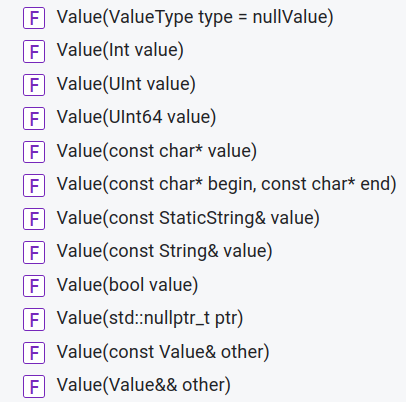
所以,当赋值发生时,编译器会根据不同值的类型,调用Value的构造函数,然后再进行赋值操作。
再去读一下源码,发现toucheventcheck里对json值的使用并没有脱离这些范畴。但这里的const char*是值得关注一下的,因为这涉及深浅拷贝的问题。我们需要看一下json库是怎么处理的:
Value::Value(const char* value) {
  initBasic(stringValue, true);
  JSON_ASSERT_MESSAGE(value != nullptr,
                      "Null Value Passed to Value Constructor");
  value_.string_ = duplicateAndPrefixStringValue(
      value, static_cast<unsigned>(strlen(value)));
}

static inline char* duplicateAndPrefixStringValue(const char* value,
                                                  unsigned int length) {

  size_t actualLength = sizeof(length) + length + 1;
  auto newString = static_cast<char*>(malloc(actualLength));

  *reinterpret_cast<unsigned*>(newString) = length;
  memcpy(newString + sizeof(unsigned), value, length);
  newString[actualLength - 1U] = 0;
  return newString;
}
原来是做了深copy的,那没问题了。
其它类型,包括std::string,也是类似的逻辑,这里就不细讲了。总之json值这块看起来是没问题的。
json::Value map key类型分析
前面我们讲到,Value可能是一个map,map的key是CZString类型。那么会不会是这里出问题了?
json::Value val;
val["key"] = "a"; //这种肯定没问题,key是常量,存在rodata里的
const char* p = ...;
val[p] = "bar"; //这种可能有问题。虽然p不能改,但是p可能指向的是可修改的内存啊,也就是其它非const指针指向的内存。
看一下Value::operator[](const char* key)的实现:
Value& Value::operator[](const char* key) {
  return resolveReference(key, key + strlen(key));
}

Value& Value::resolveReference(char const* key, char const* end) {
  if (type() == nullValue)
    *this = Value(objectValue);
  CZString actualKey(key, static_cast<unsigned>(end - key),
                     CZString::duplicateOnCopy); //注意这里,并不会像值那样每次都会深拷贝!
  auto it = value_.map_->lower_bound(actualKey);
  if (it != value_.map_->end() && (*it).first == actualKey)
    return (*it).second;

  ObjectValues::value_type defaultValue(actualKey, nullSingleton());
  it = value_.map_->insert(it, defaultValue);
  Value& value = (*it).second;
  return value;
}
这里似乎有问题,如果const char*指向的内存被销毁了,这里就可能出问题!
但是看了toucheventcheck的源码,const char*指向的都是字面常量。。。又一条线索断了
并发分析
前面分析的是相对简单的问题。目前看来json库的使用应该没问题。接下来就得考虑并发问题了。并发问题也是内存破坏的常见原因之一。
首先我们看一下出问题的数据结构,TouchFunc.cpp中的static变量event_json。我们发现所有访问到它的地方都加了锁event_json_mutex。
看来问题不是个简单的并发问题。
但是,我们知道内存破坏问题并不一定是即时触发的问题(非hwasan条件下),也就是说,踩内存发生的时候,不一定立刻crash,而是后续逻辑访问到了被踩坏的内存,才会触发。所以,我们应该分析一下event_json的数据来源是不是存在并发问题,导致json里写入了脏数据。
我们看一下TouchMain.cpp,很容易就会知道其一共有3个线程,分别是主线程,TouchDevice线程和TouchServer线程,和tombstone里一致:
int main()
{
    sp<TouchDevice> touch_device;
    sp<TouchServer> touch_server;

    // TouchDevice和TouchServer都继承了android:Thread类。注意这个类Android已经不推荐用了,应当直接用std::thread。
    touch_device = new TouchDevice();
    touch_server = new TouchServer();

    register_check_func_list();

    // 这里两个线程分别启动,进入循环。
    touch_device->threadRun();
    touch_server->run("touchevent-server", PRIORITY_BACKGROUND);

    touch_device->join();
    touch_server->join();

    unregister_check_func_list();
    return 0;
}
TouchDevice启动后,会经过以下调用链:
TouchDevice::threadLoop()
→ TouchDevice::geteventTouch()
→ TouchDevice::touchKey()
→ call_check_key_func()
→ (函数指针)check_power_key_func() or check_volume_key_func()
→ m_add_process() or m_mean_process()
而最后这两个函数都会改写touch_event_map里保存的touch_check_func_struct中的data,也就是event_json的数据来源!
另一方面,TouchServer启动后,会从socket服务端读取数据和请求你,然后执行TouchServer::handleMessage和出问题的get_event_string(),从touch_check_func_struct.data中读取数据!
所以,并发问题确实是存在的!
重点:为什么不能复现?
此时,我们分析json, toucheventcheck的源码也有一天多了,也发现了代码中的并发问题,但测试那边还是一直没能复现。
再想到,这个问题UAT测试一直没复现过,从用户试用才开始报。那么是不是我们的测试方法不对呢?
突然想到,分析TouchDevice源码的时候,好像看到数据是从驱动来的啊!
int TouchDevice::findInputDevice() {
    int retval;
    int cnt = 0, res = 0;
    struct pollfd ufds;

    for (int i = 0; i < INPUT_DEVICE_NUM; ++i) {
        for (int j = 0; j < PER_DEVICE_NUM; ++j) {
            // input_device_dir正是"/dev/input",这不就是在搜索事件源吗?
            input_fd[i][j] = searchDir(input_device_dir, findProperty[i]);
            if (input_fd[i][j] > 0) {
                ALOGE("Find %s device, fd = %d", input_device_name[i], input_fd[i][j]);
                res = 1;
                if (i == 0) {
                    string ic_name_temp = check_device_type(input_fd[i][j]);
                    if (ic_name_temp == "")
                        continue;
                    ic_name_map[input_fd[i][j]] = ic_name_temp;
                    sendMsgToFunc(SEND_IC, 0, ic_name_temp);
                }
                //ALOGD("%s: touch device ic_name is %s", __FUNCTION__, ic_name.c_str());
            }
        }
    }
...
    return res;
}
再看一下Touch同事给的测试脚本,就是简单的发广播”touchservice.intent.testonetrack”。
vendor/xiaomi/proprietary/touch/touch_ssi/TouchService/ 这个app注册了该广播,收到广播后调用hal接口”vendor.xiaomi.hw.touchfeature.ITouchFeature”,服务进程为”vendor.xiaomi.hw.touchfeature-service”,该进程会作为客户端连接名为touchevent的socket,而这个socket的服务端正是我们的toucheventcheck,其TouchServer一直监听的socket。
这下就明白了:我们根本就没有模拟事件触发,TouchDevice根本就读不到事件。只在TouchServer线程读数据,根本就触发不了并发场景!
那么接下来我们就要去模拟驱动发事件。请教了一下Touch同学,我们可以通过sendevent命令模拟驱动发事件,和getevent保持一致参数即可!getevent正是我们在调试死机问题时用于验证底层事件是否正常的命令。不过要注意的是,getevent的输出是16进制,而sendevent是10进制,我们需要转换一下。
于是迅速写好了新的测试脚本:
toucheventcheck test.sh
#!/bin/bash
adb $* root

dev_name_volup=gpio-keys
dev_name_voldown=pmic_resin
dev_name_power=pmic_pwrkey

power_index=
volup_index=
voldown_index=

# 这里比较坑,/dev/input/eventX的文件名会改,所以每次都要检测一下按键对应的文件名
for i in {0..9}
do
    dev_name=$(adb $* shell getevent -i | grep -A5 "dev/input/event$i" | grep name | awk '{print $2}' | sed s/\"//g)
    if [ "$dev_name" = $dev_name_power ]; then
        power_index=$i
    elif [ "$dev_name" = $dev_name_volup ]; then
        volup_index=$i
    elif [ "$dev_name" = $dev_name_voldown ]; then
        voldown_index=$i
    fi
done

echo "Power dev name: /dev/input/event$power_index"
echo "Volume up dev name: /dev/input/event$volup_index"
echo "Volume down dev name: /dev/input/event$voldown_index"

if [ -z "$power_index" ]; then
    echo "Power device not found!"
    exit
fi
if [ -z "$volup_index" ]; then
    echo "Volume up device not found!"
    exit
fi
if [ -z "$voldown_index" ]; then
    echo "Volume down device not found!"
    exit
fi

# Start sending events
./sendevent.sh $power_index $volup_index $voldown_index $* &
# Get pid of last background process.
sendevent_pid=$!
echo "sendevent.sh executed. pid: $sendevent_pid"

function kill_process {
    echo "Killing process $sendevent_pid"
    kill -9 $sendevent_pid
    exit
}

# Kill sendevent process if we get SIGINT or SIGTERM
trap "kill_process" SIGINT SIGTERM

# Start sending broadcast to get_event_string
adb $* shell setprop debug.onetrack.log com.miui.analytics
adb $* shell setprop debug.onetrack.upload com.miui.analytics
adb $* shell am force-stop com.miui.analytics

adb $* shell am broadcast -a "touchservice.intent.debugall" --ez "debug_all" true
adb $* shell am broadcast -a "touchservice.intent.testonetrack"

pid=$(adb $* shell pidof toucheventcheck)
i=1
while true
do
    adb $* shell am broadcast -a "touchservice.intent.testonetrack"
    echo $i
    sleep 5
    new_pid=$(adb $* shell pidof toucheventcheck)
    echo "toucheventcheck pid: $new_pid"
    if [ "$new_pid" != "$pid" ]; then
        echo "toucheventcheck crash! new pid: $new_pid"
        break
    fi
    ((i+=1))
done

kill_process
sendevent.sh
power_index=$1
volup_index=$2
voldown_index=$3
serial=
if [ "$4" = "-s" ] && [ -n "$5" ];then
serial="-s $5"
fi
echo "Power dev name: /dev/input/event$power_index"
echo "Volume up dev name: /dev/input/event$volup_index"
echo "Volume down dev name: /dev/input/event$voldown_index"
# 按一下就会产生4个事件。后面也是。
function volume_up {
echo "Volume up"
adb $serial shell sendevent /dev/input/event$volup_index 1 115 1
sleep 0.01s
# 注意这个不能少,我理解是clear状态用的。
adb $serial shell sendevent /dev/input/event$volup_index 0 0 0
sleep 0.1s
adb $serial shell sendevent /dev/input/event$volup_index 1 115 0
sleep 0.01s
adb $serial shell sendevent /dev/input/event$volup_index 0 0 0
sleep 0.3s
}
function volume_down {
echo "Volume down"
adb $serial shell sendevent /dev/input/event$voldown_index 1 114 1
sleep 0.01s
adb $serial shell sendevent /dev/input/event$voldown_index 0 0 0
sleep 0.1s
adb $serial shell sendevent /dev/input/event$voldown_index 1 114 0
sleep 0.01s
adb $serial shell sendevent /dev/input/event$voldown_index 0 0 0
sleep 0.3s
}
function power {
adb $serial shell sendevent /dev/input/event$power_index 1 116 1
sleep 0.01s
adb $serial shell sendevent /dev/input/event$power_index 0 0 0
sleep 0.1s
adb $serial shell sendevent /dev/input/event$power_index 1 116 0
sleep 0.01s
adb $serial shell sendevent /dev/input/event$power_index 0 0 0
sleep 1s
}
while true
do
# power event. Two times so that screen is on
for i in {1..2}
do
power
done
for i in {1..20}
do
volume_up
volume_down
done
done
因为时间紧迫,一些细节处理得并不好。不过这些并不重要,能用就行!
两个脚本放在同一个目录下,直接运行toucheventcheck_test.sh即可。
问题复现!
刷入hwasan版本,挂上上面两个脚本,很快,问题复现!
*** *** *** *** *** *** *** *** *** *** *** *** *** *** *** ***
Build fingerprint: 'Xiaomi/shennong/shennong:15/AQ3A.240627.003/OS2.0.241127.2.VNACNXM.STABLE-MTBF:user/test-keys'
Revision: '0'
ABI: 'arm64'
Timestamp: 2024-11-27 12:53:21.744221381+0800
Process uptime: 0s
Cmdline: /odm/bin/toucheventcheck
pid: 2841, tid: 3063, name: touchevent-serv  >>> /odm/bin/toucheventcheck <<<
uid: 0
tagged_addr_ctrl: 0000000000000001 (PR_TAGGED_ADDR_ENABLE)
pac_enabled_keys: 000000000000000f (PR_PAC_APIAKEY, PR_PAC_APIBKEY, PR_PAC_APDAKEY, PR_PAC_APDBKEY)
signal 6 (SIGABRT), code -1 (SI_QUEUE), fault addr --------

Abort message: '==2841==ERROR: HWAddressSanitizer: tag-mismatch on address 0x003f8a2f0700 at pc 0x005e8a312fd4

READ of size 8 at 0x003f8a2f0700 tags: 22/04(22) (ptr/mem) in thread T2
Invalid access starting at offset 4
    #0 0x5e8a312fd4  (/odm/bin/toucheventcheck+0x21fd4) (BuildId: d42bbe3d0e2d53d2925b6552b7a79922)
array_type<unsigned long>::toJson(Json::Value&)
vendor/xiaomi/proprietary/touch/touchtest/touchevent/Data.h:119

    #1 0x5e8a310fa4  (/odm/bin/toucheventcheck+0x1ffa4) (BuildId: d42bbe3d0e2d53d2925b6552b7a79922)
    #2 0x5e8a3158f4  (/odm/bin/toucheventcheck+0x248f4) (BuildId: d42bbe3d0e2d53d2925b6552b7a79922)
    #3 0x5e8a315518  (/odm/bin/toucheventcheck+0x24518) (BuildId: d42bbe3d0e2d53d2925b6552b7a79922)
    #4 0x70d3e5ddd8  (/apex/com.android.vndk.v34/lib64/libutils.so+0x14dd8) (BuildId: e77bb1f308a5e947e6e32ca9dbf8de47)
    #5 0x70d408368c  (/apex/com.android.runtime/lib64/bionic/hwasan/libc.so+0x8168c) (BuildId: 164a911ee96ea77858647ab8d6a51527)
    #6 0x70d406f06c  (/apex/com.android.runtime/lib64/bionic/hwasan/libc.so+0x6d06c) (BuildId: 164a911ee96ea77858647ab8d6a51527)

[0x003f8a2f0700,0x003f8a2f0720) is a small allocated heap chunk; size: 32 offset: 0

Cause: heap-buffer-overflow
0x003f8a2f0700 is located 0 bytes inside a 4-byte region [0x003f8a2f0700,0x003f8a2f0704)

这里我们明确看到,分配和访问发生在两个不同的线程。
为什么hwasan没有报并发错误呢?因为hwasan的报错只报出错的直接原因。原理上讲,它并不能确定问题是不是“设计如此”。因为在并发场景下,分配和访问发生在不同线程是正常的。所以hwasan并不能判断一个问题究竟是不是并发问题,这个只能开发者自己结合程序逻辑进行判断。前面列的hwasan报错种类里,也不包含所谓的“并发问题”

allocated by thread T1 here:
    #0 0x70d416edec  (/apex/com.android.runtime/lib64/bionic/libclang_rt.hwasan-aarch64-android.so+0x28dec) (BuildId: bd2b4326ea0cac4ac0ec1712874405a96a9f4930)
    #1 0x70d4054470  (/apex/com.android.runtime/lib64/bionic/hwasan/libc.so+0x52470) (BuildId: 164a911ee96ea77858647ab8d6a51527)
    #2 0x5e8a312624  (/odm/bin/toucheventcheck+0x21624) (BuildId: d42bbe3d0e2d53d2925b6552b7a79922)
    #3 0x5e8a30ff20  (/odm/bin/toucheventcheck+0x1ef20) (BuildId: d42bbe3d0e2d53d2925b6552b7a79922)
    #4 0x5e8a30cbec  (/odm/bin/toucheventcheck+0x1bbec) (BuildId: d42bbe3d0e2d53d2925b6552b7a79922)
    #5 0x5e8a307f54  (/odm/bin/toucheventcheck+0x16f54) (BuildId: d42bbe3d0e2d53d2925b6552b7a79922)
    #6 0x70d3e5ddd8  (/apex/com.android.vndk.v34/lib64/libutils.so+0x14dd8) (BuildId: e77bb1f308a5e947e6e32ca9dbf8de47)
    #7 0x70d408368c  (/apex/com.android.runtime/lib64/bionic/hwasan/libc.so+0x8168c) (BuildId: 164a911ee96ea77858647ab8d6a51527)
    #8 0x70d406f06c  (/apex/com.android.runtime/lib64/bionic/hwasan/libc.so+0x6d06c) (BuildId: 164a911ee96ea77858647ab8d6a51527)


Thread: T0 0x006700002000 stack: [0x007fe6758000,0x007fe6f58000) sz: 8388608 tls: [0x0070d6816f80,0x0070d681a000)
Thread: T1 0x006700006000 stack: [0x00704bdfc000,0x00704bef8c70) sz: 1035376 tls: [0x00704bef8f80,0x00704befc000)
Thread: T2 0x00670000a000 stack: [0x00704bcf8000,0x00704bdf4c70) sz: 1035376 tls: [0x00704bdf4f80,0x00704bdf8000)

Memory tags around the buggy address (one tag corresponds to 16 bytes):
  0x003f8a2eff00: 00  00  00  00  00  00  00  00  00  00  00  00  00  00  00  00
  0x003f8a2f0000: 08  00  08  00  8a  08  70  08  cf  08  cd  08  a2  08  66  66
  0x003f8a2f0100: aa  aa  d7  d7  c4  c4  f9  f9  40  08  91  08  1a  f8  eb  08
  0x003f8a2f0200: bc  08  29  08  08  00  6e  08  24  08  d8  08  01  08  b3  08
  0x003f8a2f0300: 08  00  e5  08  6d  08  78  08  08  00  51  08  54  00  6a  08
  0x003f8a2f0400: c9  08  c2  08  34  08  1c  08  9b  08  b1  b1  4b  08  08  00
  0x003f8a2f0500: 4f  08  fb  08  08  00  40  08  08  00  2f  08  f1  08  35  08
  0x003f8a2f0600: 08  00  9d  08  32  08  08  00  40  08  bd  08  08  00  3f  6c
=>0x003f8a2f0700:[04] df  dc  8e  5b  ab  00  00  00  00  00  00  00  00  00  00
  0x003f8a2f0800: 12  8e  0e  08  92  92  f1  d0  a6  08  9d  57  5b  00  3d  3d
  0x003f8a2f0900: 77  00  2e  00  ce  08  13  13  1f  1f  83  83  1d  00  b7  00
  0x003f8a2f0a00: ee  08  4d  00  1d  08  00  00  00  00  00  00  00  00  00  00
  0x003f8a2f0b00: 00  00  00  00  00  00  00  00  00  00  00  00  00  00  00  00
  0x003f8a2f0c00: 00  00  00  00  00  00  00  00  00  00  00  00  00  00  00  00
  0x003f8a2f0d00: 00  00  00  00  00  00  00  00  00  00  00  00  00  00  00  00
  0x003f8a2f0e00: 00  00  00  00  00  00  00  00  00  00  00  00  00  00  00  00
  0x003f8a2f0f00: 00  00  00  00  00  00  00  00  00  00  00  00  00  00  00  00

Tags for short granules around the buggy address (one tag corresponds to 16 bytes):
  0x003f8a2f0600: 7d  ..  ..  9d  ..  32  9f  ..  ..  40  ..  bd  e2  ..  ..  ..
=>0x003f8a2f0700:[22] ..  ..  ..  ..  ..  ..  ..  ..  ..  ..  ..  ..  ..  ..  ..
  0x003f8a2f0800: ..  ..  ce  0e  ..  ..  ..  ..  ..  a6  ..  ..  ..  ..  ..  ..
See https://clang.llvm.org/docs/HardwareAssistedAddressSanitizerDesign.html#short-granules for a description of short granule tags

Registers where the failure occurred (pc 0x005e8a312fd4):
    x0  2200003f8a2f0700  x1  0000000000000000  x2  0000000000000000  x3  7c85c4b98a9da3c4
    x4  000000704bcf8000  x5  0000000000000014  x6  000000704bcf8000  x7  0000000000000001
    x8  2200003f8a2f0700  x9  000000704bdf3ea0  x10 0000000000000008  x11 0000000000000008
    x12 000000000000001d  x13 65287c1a5ae4a9cb  x14 160e2d023a0e0a1b  x15 00000000ffffffff
    x16 00000070d417446c  x17 0000000000000007  x18 000000704a0d4000  x19 880000704bdf3f00
    x20 0200006800000000  x21 0000000000000000  x22 e50000408a2f04c0  x23 080000704bdf3ed0
    x24 c80000704bdf3ea0  x25 e50000408a2f04d0  x26 0000000000000000  x27 0200006f04bdf3f0
    x28 e50000408a2f04d8  x29 000000704bdf3f40  x30 0000005e8a312fd8   sp 000000704bdf3e70
Learn more about HWASan reports: https://source.android.com/docs/security/test/memory-safety/hwasan-reports
SUMMARY: HWAddressSanitizer: tag-mismatch (/odm/bin/toucheventcheck+0x21fd4) (BuildId: d42bbe3d0e2d53d2925b6552b7a79922) '
    x0  0000000000000000  x1  0000000000000bf7  x2  0000000000000006  x3  aa0000704bdeffe0
    x4  64796873686d6052  x5  64796873686d6052  x6  64796873686d6052  x7  7f7f7f7f7f7f7f7f
    x8  00000000000000f0  x9  0000000000000000  x10 ffffff80ffffffdf  x11 00000070d408a4b0
    x12 0000000000000008  x13 000000704bdeffe0  x14 0000000000000002  x15 02000067ffffffff
    x16 00000070d4111220  x17 00000070d40f92b0  x18 000000704a0d4000  x19 2a0000704bdeffe0
    x20 ea0000704bdeffd0  x21 6a0000704bdeffb0  x22 aa0000704bdeffe0  x23 0000000000000000
    x24 0000000000000bf7  x25 0200006800000000  x26 0040000ce000132a  x27 0101010101010101
    x28 0000000704bdeffe  x29 000000704bdf0070
    lr  00000070d4069c2c  sp  000000704bdeffa0  pc  00000070d4069c58  pst 0000000000001000

16 total frames
backtrace:
      #00 pc 0000000000067c58  /apex/com.android.runtime/lib64/bionic/hwasan/libc.so (abort+332) (BuildId: 164a911ee96ea77858647ab8d6a51527)
      #01 pc 000000000003ae5c  /apex/com.android.runtime/lib64/bionic/libclang_rt.hwasan-aarch64-android.so (__sanitizer::Abort()+60) (BuildId: bd2b4326ea0cac4ac0ec1712874405a96a9f4930)
      #02 pc 0000000000039720  /apex/com.android.runtime/lib64/bionic/libclang_rt.hwasan-aarch64-android.so (__sanitizer::Die()+204) (BuildId: bd2b4326ea0cac4ac0ec1712874405a96a9f4930)
      #03 pc 000000000002e420  /apex/com.android.runtime/lib64/bionic/libclang_rt.hwasan-aarch64-android.so (__hwasan::ScopedReport::~ScopedReport()+524) (BuildId: bd2b4326ea0cac4ac0ec1712874405a96a9f4930)
      #04 pc 000000000002dc20  /apex/com.android.runtime/lib64/bionic/libclang_rt.hwasan-aarch64-android.so (__hwasan::(anonymous namespace)::BaseReport::~BaseReport()+20) (BuildId: bd2b4326ea0cac4ac0ec1712874405a96a9f4930)
      #05 pc 000000000002bac4  /apex/com.android.runtime/lib64/bionic/libclang_rt.hwasan-aarch64-android.so (__hwasan::ReportTagMismatch(__sanitizer::StackTrace*, unsigned long, unsigned long, bool, bool, unsigned long*)+676) (BuildId: bd2b4326ea0cac4ac0ec1712874405a96a9f4930)
      #06 pc 0000000000021428  /apex/com.android.runtime/lib64/bionic/libclang_rt.hwasan-aarch64-android.so (__hwasan::HandleTagMismatch(__hwasan::AccessInfo, unsigned long, unsigned long, void*, unsigned long*)+360) (BuildId: bd2b4326ea0cac4ac0ec1712874405a96a9f4930)
      #07 pc 0000000000023730  /apex/com.android.runtime/lib64/bionic/libclang_rt.hwasan-aarch64-android.so (__hwasan_tag_mismatch4+92) (BuildId: bd2b4326ea0cac4ac0ec1712874405a96a9f4930)
      #08 pc 000000000002e4b0  /apex/com.android.runtime/lib64/bionic/libclang_rt.hwasan-aarch64-android.so (__hwasan_tag_mismatch+140) (BuildId: bd2b4326ea0cac4ac0ec1712874405a96a9f4930)
      #09 pc 0000000000021fd4  /odm/bin/toucheventcheck (array_type<unsigned long>::toJson(Json::Value&)+340) (BuildId: d42bbe3d0e2d53d2925b6552b7a79922)
      #10 pc 000000000001ffa4  /odm/bin/toucheventcheck (get_event_string()+476) (BuildId: d42bbe3d0e2d53d2925b6552b7a79922)
      #11 pc 00000000000248f4  /odm/bin/toucheventcheck (TouchServer::handleMessage(int, msg_t*)+180) (BuildId: d42bbe3d0e2d53d2925b6552b7a79922)
      #12 pc 0000000000024518  /odm/bin/toucheventcheck (TouchServer::threadLoop()+804) (BuildId: d42bbe3d0e2d53d2925b6552b7a79922)
      #13 pc 0000000000014dd8  /apex/com.android.vndk.v34/lib64/libutils.so (android::Thread::_threadLoop(void*)+284) (BuildId: e77bb1f308a5e947e6e32ca9dbf8de47)
      #14 pc 000000000008168c  /apex/com.android.runtime/lib64/bionic/hwasan/libc.so (__pthread_start(void*)+140) (BuildId: 164a911ee96ea77858647ab8d6a51527)
      #15 pc 000000000006d06c  /apex/com.android.runtime/lib64/bionic/hwasan/libc.so (__start_thread+68) (BuildId: 164a911ee96ea77858647ab8d6a51527)

buffer分配栈addr2line:
allocated by thread T1 here:
    #0 0x70d416edec  (/apex/com.android.runtime/lib64/bionic/libclang_rt.hwasan-aarch64-android.so+0x28dec) (BuildId: bd2b4326ea0cac4ac0ec1712874405a96a9f4930)
    #1 0x70d4054470  (/apex/com.android.runtime/lib64/bionic/hwasan/libc.so+0x52470) (BuildId: 164a911ee96ea77858647ab8d6a51527)
    #2 0x5e8a312624  (/odm/bin/toucheventcheck+0x21624) (BuildId: d42bbe3d0e2d53d2925b6552b7a79922)
std::__1::__libcpp_allocate(unsigned long, unsigned long)
external/libcxx/include/new:239
std::__1::allocator<int>::allocate(unsigned long, void const*)
external/libcxx/include/memory:1814
std::__1::allocator_traits<std::__1::allocator<int> >::allocate(std::__1::allocator<int>&, unsigned long)
external/libcxx/include/memory:1547
std::__1::__split_buffer<int, std::__1::allocator<int>&>::__split_buffer(unsigned long, unsigned long, std::__1::allocator<int>&)
external/libcxx/include/__split_buffer:311 (discriminator 8)
void std::__1::vector<int, std::__1::allocator<int> >::__push_back_slow_path<int>(int&&)
external/libcxx/include/vector:1618 (discriminator 6)

    #3 0x5e8a30ff20  (/odm/bin/toucheventcheck+0x1ef20) (BuildId: d42bbe3d0e2d53d2925b6552b7a79922)
std::__1::vector<int, std::__1::allocator<int> >::push_back(int&&)
external/libcxx/include/vector:1659
void m_add_process<int>(array_type<int>*, int, int)
vendor/xiaomi/proprietary/touch/touchtest/touchevent/TouchFunc.cpp:138
check_power_key_func(touch_check_func_struct*, timeval, unsigned int, int)
vendor/xiaomi/proprietary/touch/touchtest/touchevent/TouchFunc.cpp:683

    #4 0x5e8a30cbec  (/odm/bin/toucheventcheck+0x1bbec) (BuildId: d42bbe3d0e2d53d2925b6552b7a79922)
call_check_key_func(timeval, unsigned int, int)
vendor/xiaomi/proprietary/touch/touchtest/touchevent/TouchFunc.cpp:411
TouchDevice::touchKey(timeval, unsigned int, int)
vendor/xiaomi/proprietary/touch/touchtest/touchevent/TouchFunc.cpp:161

    #5 0x5e8a307f54  (/odm/bin/toucheventcheck+0x16f54) (BuildId: d42bbe3d0e2d53d2925b6552b7a79922)
TouchDevice::geteventKeyPower(input_event*)
vendor/xiaomi/proprietary/touch/touchtest/touchevent/TouchDevice.cpp:613
TouchDevice::threadLoop()
vendor/xiaomi/proprietary/touch/touchtest/touchevent/TouchDevice.cpp:780
正如我们前文并发分析的那样,两个线程在同时访问array_type,一个读一个写。
因为是hwasan版本,所以问题第一时间就报了上来,而不是等到脏数据写到json::Value,且这个Value析构的时候才上报。
我们来看看buffer分配点的逻辑:

1644 template <class _Tp, class _Allocator>
1645 inline _LIBCPP_INLINE_VISIBILITY
1646 void
1647 vector<_Tp, _Allocator>::push_back(value_type&& __x)
1648 {
1649     if (this->__end_ < this->__end_cap())
1650     {
...          capacity够用,走这里
1657     }
1658     else
1659         __push_back_slow_path(_VSTD::move(__x));  <<<<<<< 走到这里,说明vector要扩容了。buffer已重新分配了,所以tag发生了变化
1660 }
读取线程,也就是报错点:
template <class T1>
struct array_type : public data_interface {
    array_type(const char *name) : data_interface(name) {}

    virtual bool toJson(Json::Value &json) override {
        Json::Value tempArray(Json::arrayValue);
        if (!arrayData.empty()) {
            Json::Value tempArray(Json::arrayValue);
            for (int i= 0; i < arrayData.size(); i++) {
                tempArray.append(arrayData[i]);          <<<<<<<<< 这里报错,arrayData[i]访问了旧buffer。
            }
            json[name] = tempArray;
            return true;
        }
        return false;
    }
因为写buffer的地方正在扩容,所以如果不是hwasan版本,读buffer并不一定会报错,这块内存刚被回收,数据还在,所以还能读到。
那为什么非hwasan版本,报错都是在Value析构的时候呢?似乎读了脏数据也不应该影响到json对象。
想到一个可能是,scudo本身不是线程安全的,json map在append途中也发生了扩容操作,于是scudo出现了并发问题。查看scudo的文档:
"corrupted chunk header": the checksum verification of the chunk header has failed. This is likely due to one of two things: the header was overwritten (partially or totally), or the pointer passed to the function is not a chunk at all;

"race on chunk header": two different threads are attempting to manipulate the same header at the same time. This is usually symptomatic of a race-condition or general lack of locking when performing operations on that chunk;
报错的正是corrupted chunk header。
修复方案
既然是个并发问题,那么既然就要用并发问题的修复思路。
目前的修复方案是加锁保护,已由业务组合入。
但这块代码其实还有更好的设计思路。通过对源码的阅读,以及和Touch模块同事的交流,了解到这块其实只是打点数据。此类逻辑对实时性要求不高,所以最好的设计思路是把对相同数据结构的操作放在一个线程里执行,避免并发。
如果一定要用锁,也可以用性能更好的锁。在这个场景里,两个线程分别只对同一个数据结构做读写操作,所以用读写锁是更好的选择。
当然,这些优化方案需要的改动更多,只能放在长远规划里。目前先用加锁方案解决线上问题是权宜之计。
问题结论
N2/N2T:OS2.0.101.0.VNBCNXM
N3:OS2.0.101.0.VNCCNXM
这两个带修复的版本,已不再复现,证明修复有效。
同时也说明,我们对hwasan版本和非hwasan版本报错点不一致的原因推测基本正确。非hwasan版本,在读取vector脏数据时并未报错,因为在数据量不大的情况下,归还给scudo的内存仍然可读,所以不会立即报错。但在写入event_json时,其依托的map仍然会触发scudo的释放、分配操作,这个过程中就出现了scudo的并发访问,踩坏了chunk header,导致在析构json::Value时报”corrupted chunk header”。但是究竟具体是怎么踩坏的chunk header,由于hwasan和非hwasan的报错点之间还是有不少STL和scudo的逻辑,因此确实很难定位到。我曾经尝试模拟此问题的场景,但没能成功复现问题。所以非hwasan版本此问题的触发确实有较高的复杂性。
思考复盘
该问题暴露出现有稳定性测试的一个严重隐患,就是所依赖的monkey测试注入事件的层级偏高,导致底层的一些case根本测试不到!
我们来看一下与本问题关系最紧密的一些事件的注入方式。
按键事件key event的注入:
public class MonkeyKeyEvent extends MonkeyEvent {
    ...
    @Override
    public int injectEvent(IWindowManager iwm, IActivityManager iam, int verbose) {
        if (verbose > 1) {
            String note;
            if (mAction == KeyEvent.ACTION_UP) {
                note = "ACTION_UP";
            } else {
                note = "ACTION_DOWN";
            }
            ...
        }

        KeyEvent keyEvent = mKeyEvent;
        if (keyEvent == null) {
            ...
            keyEvent = new KeyEvent(downTime, eventTime, mAction, mKeyCode,
                    mRepeatCount, mMetaState, mDeviceId, mScanCode,
                    KeyEvent.FLAG_FROM_SYSTEM, InputDevice.SOURCE_KEYBOARD);
        }
        if (!InputManagerGlobal.getInstance().injectInputEvent(keyEvent,
                InputManager.INJECT_INPUT_EVENT_MODE_WAIT_FOR_RESULT)) {
            return MonkeyEvent.INJECT_FAIL;
        }
        return MonkeyEvent.INJECT_SUCCESS;
    }
Motion Event:
public abstract class MonkeyMotionEvent extends MonkeyEvent {
    @Override
    public int injectEvent(IWindowManager iwm, IActivityManager iam, int verbose) {
        MotionEvent me = getEvent(); // getEvent会随机生成一个MotionEvent实例。
        try {
            if (!InputManagerGlobal.getInstance().injectInputEvent(me,
                    InputManager.INJECT_INPUT_EVENT_MODE_WAIT_FOR_RESULT)) {
                return MonkeyEvent.INJECT_FAIL;
            }
        } finally {
            me.recycle();
        }
        return MonkeyEvent.INJECT_SUCCESS;
    }
可以看到,两类事件都是绕过了底层,直接通过InputManagerGlobal注入,这就导致驱动实际并没有产生任何事件,所以toucheventcheck相当于是没有经过稳定性测试的!
因此,我们需要优化MTBF测试工具,不能仅依赖monkey注入事件,还应该加入模拟驱动的事件,就像本问题一样,利用sendevent发送事件,这样才能测试到更全的case。
Touch测试同学张晗(zhanghan10)跟进中。