QAC 发布订阅中间件使用文档
注意事项!!!
⚠️ 不要使用 QAC 传递长度为0的消息! 针对 Proto3 结构只包含数值类型,并且全是默认值时,序列化后消息长度为0,因为 Proto3 对数值类型的默认值不进行序列化操作。 参考文档:https://protobuf.dev/programming-guides/proto3/#default
Note that for implicit-presence scalar fields, once a message is parsed there’s no way of telling whether that field was explicitly set to the default value (for example whether a boolean was set to
false) or just not set at all: you should bear this in mind when defining your message types. For example, don’t have a boolean that switches on some behavior when set tofalseif you don’t want that behavior to also happen by default. Also note that if a scalar message field is set to its default, the value will not be serialized on the wire. If a float or double value is set to +0 it will not be serialized, but -0 is considered distinct and will be serialized.
解决方法:
- 不要只设置默认值。
- 新增冗余字段从不为默认值,保障序列化后消息长度大于 0。
简介
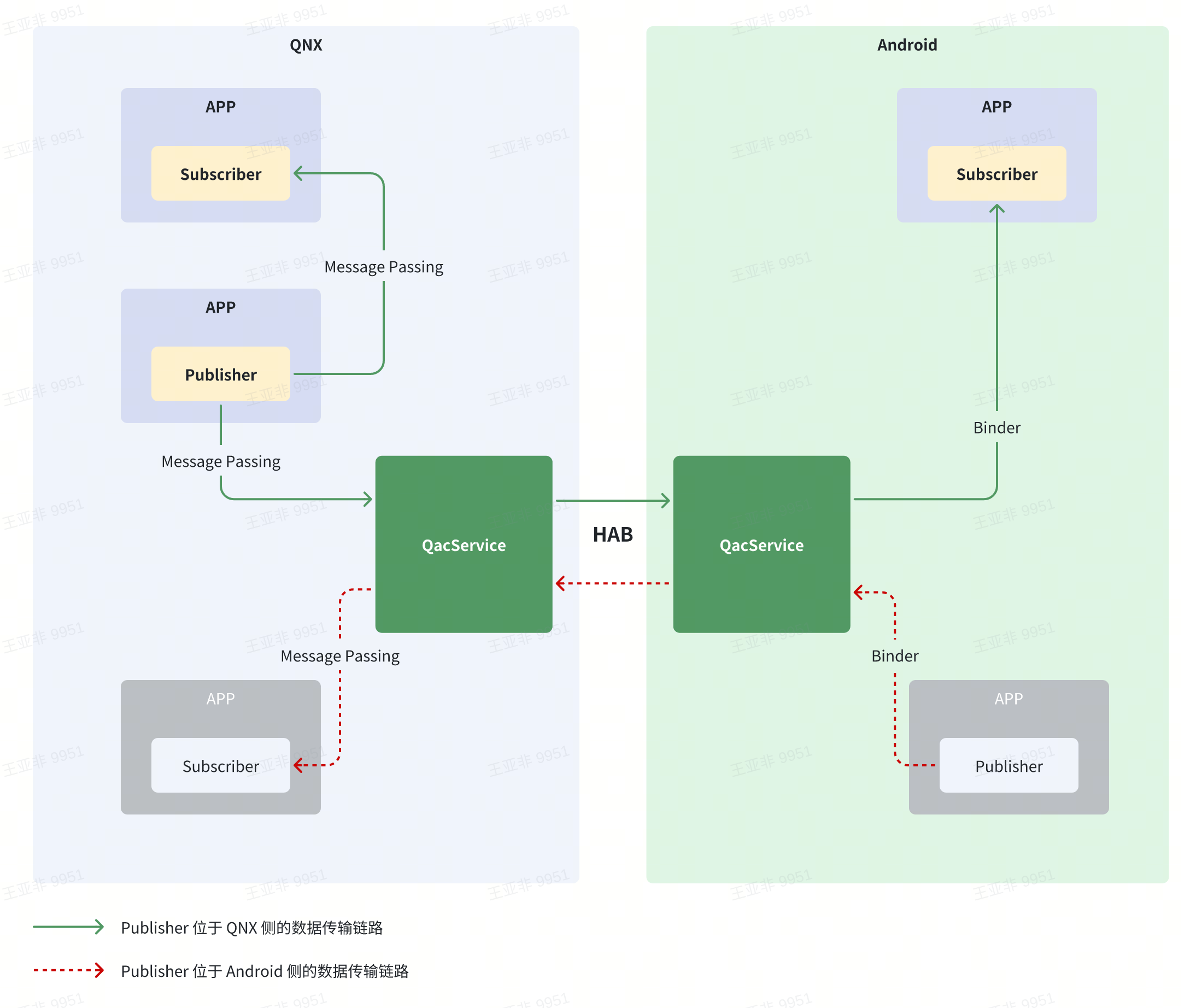
QacService是一套基于resource manager、channel和HAB实现的,支持发布订阅的QNX/Android通信中间件。HAB是Android和QNX之间的共享内存通道,数据传递效率高;channel是qnx系统内的高效IPC方式。该方案的优点在于不依赖网络,所以在开机时,Publisher和Subscriber之间的通信不需要依赖网卡就绪。
Qac 和 原来的dds不互通,通信双方都需切换到qac的通讯方式上。
白板流程图:QacService 软件分层架构(自上而下)
Applications(应用层,暗蓝色) :
Map|Audio|HUD|...IDL(接口描述层,灰色) :
Protobuffer|Flatbuffers|RawAPI(用户接口层,紫色) :
Publisher|Subscriber|QoSQAC SDK(左侧浅蓝容器,QAC 客户端 SDK) + QAC Service(右侧浅绿容器,QAC 服务端)
- QAC SDK 内组件(浅紫):
StateManager/QoSMessageQueue/Channel Manager- QAC Service 内组件(绿色):
Node Manager/Service Manager/Message CenterProxy Manager/Channel Manager/Message ParserMonitor(右侧独立大块)Transport(传输层,粉紫色) :
QNX Resource Manager→QNX Message Passing(QNX 侧 IPC) |Andriod Binder(Android 侧 IPC) |HAB(QNX ↔ Android 共享内存通道)说明:左侧 QNX 侧通过 Resource Manager + Message Passing 与 QAC Service 通信,经 HAB 跨系统到右侧 Android;右侧 Android 侧通过 Binder 与 QAC Service 通信。
功能特性
- 发布订阅。支持在同一个 Topic 下创建多个 Publisher 和多个 Subscriber。
- 松耦合。发布者和订阅者之间,没有连接的概念,发布者发布数据,并不依赖是否有订阅者。
- 缓存最后一条历史消息。可通过配置 Publisher 是否缓存最后一条历史消息,发送给新上线的 Subscriber,Subscriber也可以配置是否接收最后一条历史消息。
❗ 由于发布者和订阅者没有连接的概念,所以,发布者发布的消息并不能保障订阅者一定能收到。例如,如果订阅者启动的较晚,发布者已发布过的消息订阅者可能错过。配置发布/接收历史消息,可收到最后一条Publisher已发布过的消息;或者监听subscriber的上线事件,进行重发。
适用场景:
- 周期性发布的消息。
- 最新事件通知。
性能
测试条件:
- ping/pong 测试。发起方发送特定大小数据包,接收方原样返回数据包,由发起方统计时延。
- 100HZ发送频率。
- 跨QNX和Android通信。
「引用图表」无法展示,请点击「https://miworkpro.mioffice.cn/doc」查询原私有化文档,查看该部分内容
编译
QNX侧编译
在 apps/micar/ 下编译中间件:
cd apps/micar
./bazel_build_base/scripts/build_micar_base.sh
Android侧编译
- Native层
- HAL层
- 应用层
使用
QNX
设置环境变量
要依赖QacService中间件的库文件和头文件,需要先设置中间件的环境变量。
source apps/micar/micar_mw_env_qnx.shCMake 依赖方法
# 导入中间件的库
if(NOT DEFINED ENV{MICAR_MW_CMAKE_FILE})
  message(FATAL_ERROR "not defined environment variable:MICAR_MW_CMAKE_FILE")
endif()
include($ENV{MICAR_MW_CMAKE_FILE})
include($ENV{THIRD_PARTY_CMAKE_FILE})
... ...
target_link_libraries(qac_example PUBLIC
    ${MICAR_MW_V2_LIBRARIES})
Makefile 依赖方法
ifndef QCONFIG
QCONFIG=qconfig.mk
endif
include $(QCONFIG)

include $(MICAR_MW_MK_FILE)
include $(THIRD_PARTY_MK_FILE)

... ...

LIBS+= $(PROTOBUF_LIBRARIES)
LIBS+= $(MICAR_MW_V2_LIBRARIES)
... ...
Bazel (推荐)
cc_binary(
  name = "helloworld",
  srcs = [
      "hello_world_main.cpp",
  ],

  deps = [
      "@micar_mw_v2//:qac_interface", # 引入qac_interface依赖
  ],
)
)
接口使用
 #include <string>
 #include <iostream>
 #include <thread>
 #include <memory>
 #include <chrono>

 #include "energy.pb.h"

 #include <qac_interface/node.h>   // (1) 包含 qac_interface/node.h 头文件

 void messageCallback(const micar::Energy& energy) {
  std::cout << "get message id: " << energy.id() << " time: " << energy.timestamp() << std::endl;
}

class ExamplePublisherListener : public AbstractPublisherListener {
 public:
  void onSubscriberStatus(const MiSubscriberStatus& status) {
    std::cout << "onSubscriberStatus nid = " << status.nid
              << ", status = " << static_cast<int>(status.status)
              << ", total count = " << status.current_total_count << std::endl;
  }
};

 int main() {
     std::string name = "QacExampleName";
     micar::middleware::interface::init(name, nullptr); // (2) 初始化

     std::shared_ptr<micar::middleware::interface::Node> node =
             micar::middleware::interface::Node::createNode(); // (3) 创建 node

     micar::middleware::common::QosConfig qos;
     qos.enableHistory(true); // (4)设置是否发送/接收最后一条历史数据

     // (5)创建publisher
     auto publisher = node->createFactory<micar::Energy>()->createPublisher(
        "topicName1", std::make_unique<ExamplePublisherListener>(), qos);
     if (publisher == nullptr) {
         return -1;
     }

     auto subscriber = node->createFactory<micar::Energy>()->createSubscriber(
        "subTopicName", &messageCallback, nullptr, qos); // 创建subscriber
     if (subscriber == nullptr) {
         return -1;
     }

    while (true) {
        std::this_thread::sleep_for(std::chrono::seconds(2));
    }

    return 0;
 }
(1)包含头文件。
#include "qac_interface/node.h"(2)初始化。
首先需要调用初始化函数,初始化会初始化资源并创建和QacService的连接。name参数需要保障进程级别的唯一性。
bool init(const std::string& name, std::unique_ptr<AbstractServiceListener> service_listener = nullptr);
-
参数
name:客户端的名字,要保证系统内是唯一的。service_listener:服务状态的监听。
-
返回值
true:初始化成功。false:初始化失败
(3)创建Node。
Node是创建Pubscriber和Subscriber的工厂示例的工具类。
  template <typename MessageT>
std::unique_ptr<AbstractFactory<MessageT>> createFactory(IPCType type = IPCType::MI_QAC);-
参数
type:创建的实例工程类型,目前只支持 IPCType::MI_QAC。可不传。
-
返回值
std::unique_ptr<AbstractFactory<MessageT>>:特定类型的工厂实例。
(4)配置qos。
class QosConfig {
public:
  QosConfig() {}
  ~QosConfig() = default;
  bool enableHistory();
  void enableHistory(bool enable_history);
};
void enableHistory(bool enable_history);
-
参数
enable_history: 表示是否接收最后一条历史数据。true 表示接收,false 表示不接收。默认为 false。
(5)创建 Publisher。
  virtual std::unique_ptr<AbstractPublisher<MessageT>> createPublisher(
      const std::string &topic_name) = 0;

  virtual std::unique_ptr<AbstractPublisher<MessageT>> createPublisher(
      const std::string& topic_name,
      std::unique_ptr<AbstractPublisherListener> listener) = 0;

  virtual std::unique_ptr<AbstractPublisher<MessageT>> createPublisher(
      const std::string& topic_name,
      std::unique_ptr<AbstractPublisherListener> listener,
const common::QosConfig& qos) = 0;-
参数
topic_name:要发布的Topic的名字。listener:设置subscriber上下线的监听,默认为 nullptr。详见注册 AbstractPublisherListener。qos:qos配置。
-
返回值
std::unique_ptr<AbstractPublisher<MessageT>>:特定类型的 Publisher 实例。
(6)注册 AbstractPublisherListener
| 接口声明 | void AbstractPublisherListener::onSubscriberStatus(const MiSubscriberStatus &status); |
|---|---|
| 接口描述 | Publisher 发现了一个 subscriber 上线,onSubscriberStatus 会被调用。 |
| 参数 - status | MiSubscriberStatus:Nid(uint64_t) 发生状态变化的subscriber唯一ID;Status(ONLINE 上线 / OFFLINE 下线);current_total_count(uint32_t) 当前发现的subscriber总数。 |
| 返回值 | - |
class ExamplePublisherListener : public AbstractPublisherListener {
public:
  void onSubscriberStatus(const MiSubscriberStatus& status) {
    if (status.status == MiSubscriberStatus::Status::ONLINE) {
      std::cout << "onSubscriberStatus subscriber " << status.nid << " online." << std::endl;
    } else if (status.status == MiSubscriberStatus::Status::OFFLINE) {
      std::cout << "onSubscriberStatus subscriber " << status.nid << " offline." << std::endl;
    }
    std::cout << "onSubscriberStatus current subscriber total count " << status.current_total_count << std::endl;
  }
};
(7)创建Subscriber。
  virtual std::unique_ptr<AbstractSubscriber<MessageT>> createSubscriber(
      const std::string& topic_name,
      const CallbackFunc<MessageT>& subscribe_func) = 0;

  virtual std::unique_ptr<AbstractSubscriber<MessageT>> createSubscriber(
      const std::string& topic_name,
      const CallbackFunc<MessageT>& subscribe_func,
      std::unique_ptr<AbstractSubscriberListener> listener,
const common::QosConfig& qos) = 0;-
参数
topic_name:要订阅的Topic的名字。subscribe_func:所订阅的Topic消息的回调函数。qos:qos配置。
-
返回值
std::unique_ptr<AbstractSubscriber<MessageT>>:特定类型的 Subscriber 实例。
示例程序
📎 QNX 示例程序 (tar.gz, 5.2K):qac_example_qnx.tar.gz 内容:
qac_helloworld/(含energy.proto、CMakeLists.txt、BUILD、Makefile、hello_world_main.cpp、aarch64 工具链配置等)
代码路径:apps/micar/libs/mw/micar_mw/v2/example/qnx
Android Java
示例程序
依赖jar包:
implementation "mi.car:core.api:0.1.2.39"最新版本:https://pkgs.d.xiaomi.net/artifactory/maven-snapshot-virtual/mi/car/core.api/
📎 Android Java 示例程序 (zip, 864K):qac_example_android_java.zip 内容:
QacDemo/(含MainActivity.java、build.gradle、Android_bp、OWNERS、IDEA 工程文件等)
Android Native(C++)
Android bp 依赖方法
cc_binary {
    name: "demo_name",
    vendor: true,
    srcs: [
        "..cpp",
    ],
    shared_libs: [
        "vendor.micar.hardware.qac-V1-ndk_platform",
        "libbinder_ndk",
        "libutils",
    ],
}
使用
/*
 * Copyright (C) 2023 Xiaomi Inc. All rights reserved.
 */

#include <atomic>
#include <functional>
#include <memory>
#include <string>
#include <iostream>

#include <android-base/logging.h>
#include <android/binder_ibinder.h>
#include <android/binder_manager.h>
#include <android/binder_process.h>
#include <android/binder_auto_utils.h>

#include <aidl/vendor/micar/hardware/qac/IQac.h>

using namespace ::aidl::vendor::micar::hardware::qac;


void onBinderDied(void *cookie) {
    auto func = *reinterpret_cast<std::function<void()>*>(cookie);
    func();
}

int32_t main() {
    ABinderProcess_startThreadPool();
    std::atomic_bool run = true;
    const std::string instance = std::string(IQac::descriptor) + "/default";
    std::cout << "Obtaining: " << instance << std::endl;
    auto spBinder = ndk::SpAIBinder(AServiceManager_getService(instance.c_str()));

    // register binder death handle
    ndk::ScopedAIBinder_DeathRecipient deathRecipient(AIBinder_DeathRecipient_new(onBinderDied));
    //  binder died callback
    std::function<void()> deathRecipientFunc = [&]() {
        std::cout << "Binder died, ready to exit" << std::endl;
        run = false;
    };
    auto state = AIBinder_linkToDeath(spBinder.get(), deathRecipient.get(),
            reinterpret_cast<void*>(&deathRecipientFunc));
    if (state != STATUS_OK) {
        return EXIT_FAILURE;
    }
    std::shared_ptr<IQac> service = IQac::fromBinder(spBinder);
    if (!service) {
        std::cout << "IQac service not found, may be still initializing?" << std::endl;
        return -1;
    }

    while (run) {
        std::cout << "Please enter topic to publish. Enter \"exit\" to exit" << std::endl;
        std::string topic;
        std::cin >> topic;
        if (topic == "exit") {
            break;
        }
        std::cout << "Please enter string data to publish" << std::endl;
        std::string str;
        std::cin >> str;

        std::shared_ptr<IPublisher> pub;
        std::cout << "Create publisher: "<< service->createPublisher(topic, 0, &pub).getStatus()
            << std::endl;
        if (pub == nullptr) {
            break;
        }
        std::vector<uint8_t> data(str.begin(), str.end());
        std::cout << "Publish: " << pub->publishData(data).getStatus() << std::endl;
    }
    // unregister binder death handle
    AIBinder_unlinkToDeath(spBinder.get(), deathRecipient.get(), &deathRecipientFunc);
    return EXIT_FAILURE;  // should never be reached
}
示例程序
📎 Android Native 示例程序 (tar.gz, 1.7K):qac_example_android_native.tar.gz 内容:
aidl_demo/(含Android.bp、subscriber.cpp、publisher.cpp)
代码路径:lagvm/LINUX/android/vendor/micar/proprietary/qacservice/demos
测试和调试
参见:中间件测试程序使用文档
常见问题
需要配置selinux权限
Android侧是使用binder,需要配置selinux权限,否则会报类似以下错误
04-17 10:44:53.994 7793 7799 I ServiceManager: Waiting for service 'vendor.micar.hardware.qac.IQac/default' on '/dev/binder'...