非联动亮灭屏离屏问题分析 - DrawFrames 96187 allocateImageMemory 根因分析报告
分析时间: 2026-05-26
Trace 文件:perfetto_1779783908.pftrace
进程:com.android.systemui(PID 5569)
线程: RenderThread (TID 6163)
1. 问题描述
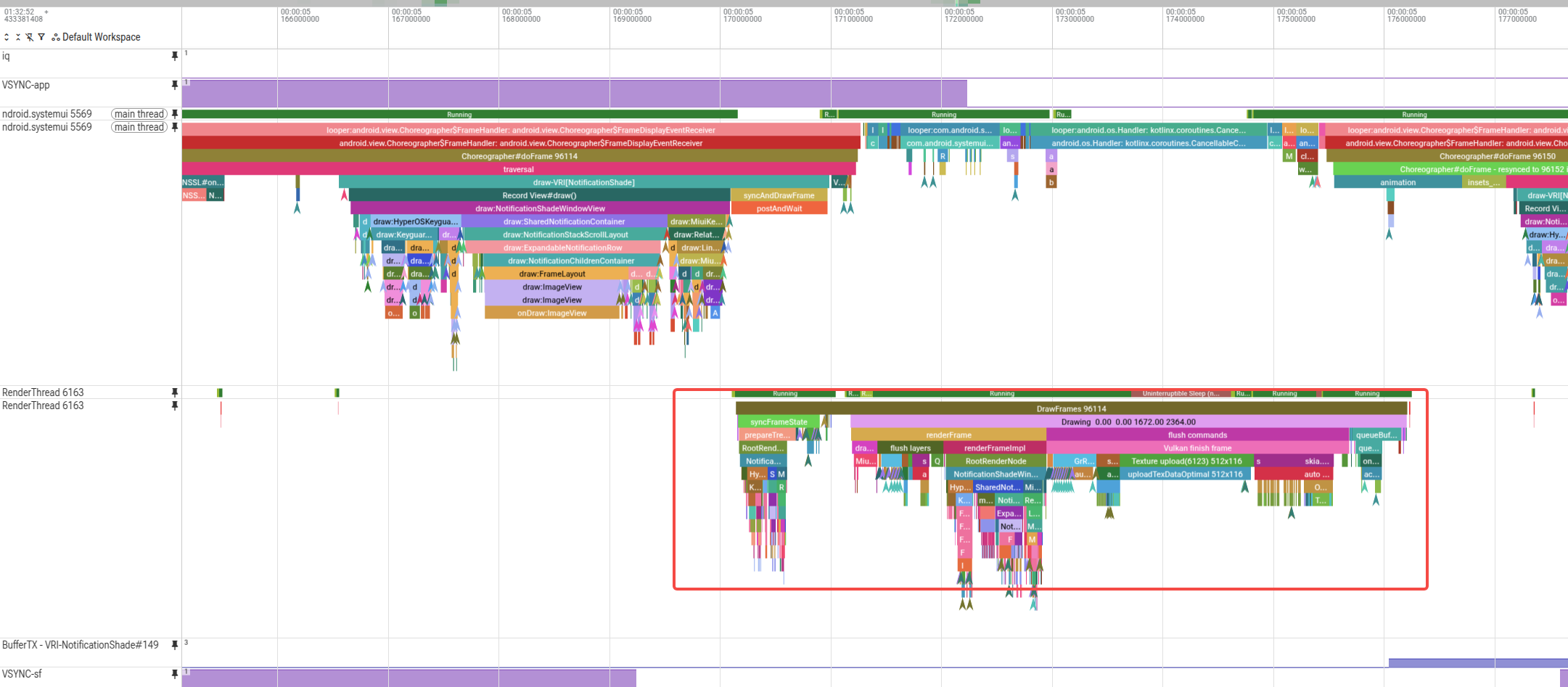
DrawFrames 96187 帧中出现 16 次 allocateImageMemory 调用,GPU 缓存利用率从 22.5% 飙升至 55.1%,单帧新增约 62MB GPU 内存分配。其中包含:
- 3 次 ~10MB 分配(10,327,616 bytes)
- 2 次 ~17MB 分配(17,839,680 bytes)
- 11 次小型分配(37KB ~ 805KB)
帧总耗时 3.967ms,其中 flush commands 阶段(Vulkan finish frame)耗时 2.167ms,占帧耗时 54.6%。
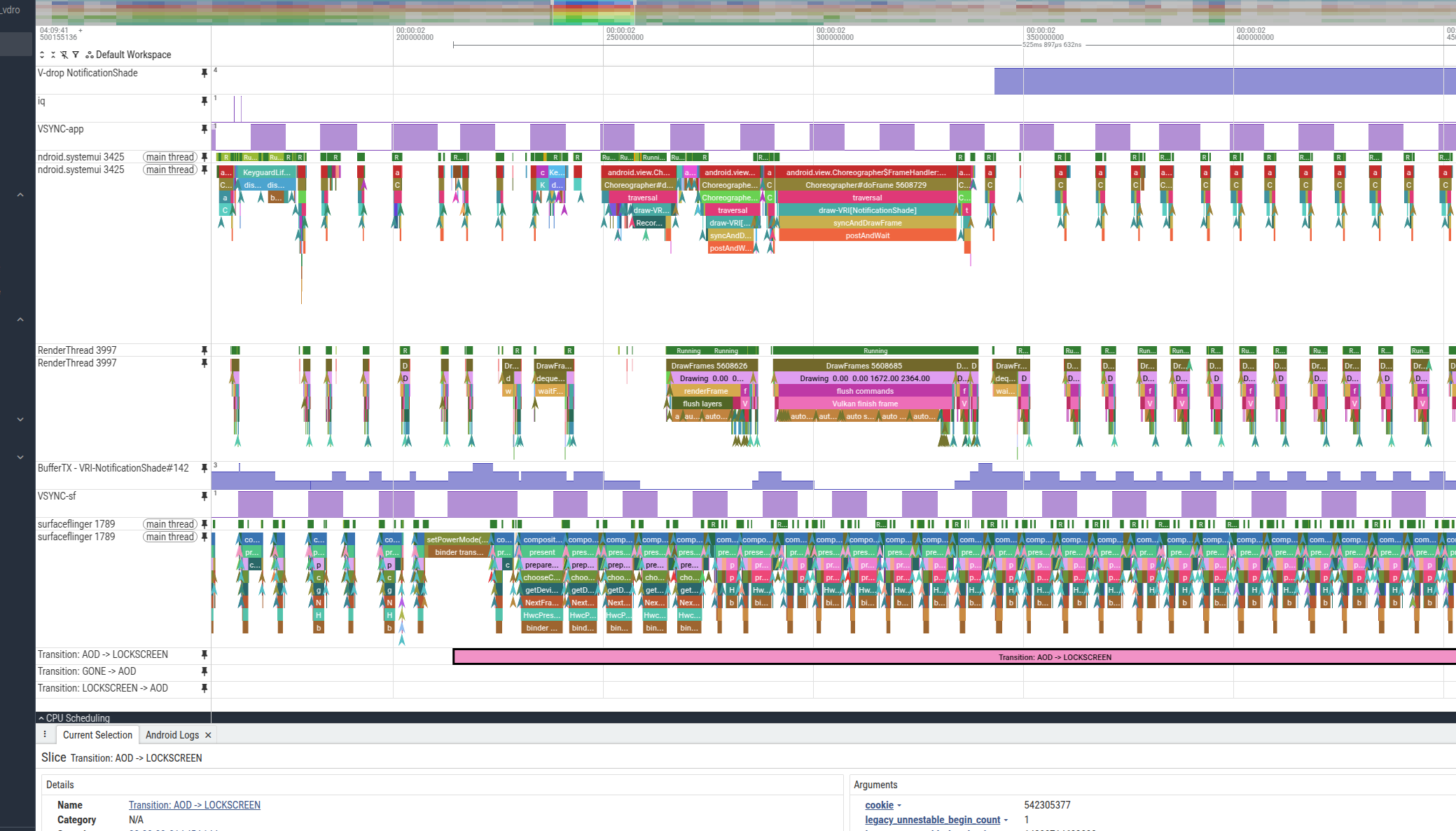
附件: perfetto_1779783908.pftrace(原始分析 trace,1.7MB)
开开关复现 trace
附件: perfetto_trace_reproduce.pftrace(开关复现 trace,427MB)
当前报告分析skill
附件: analysis_skill.zip(分析 skill 包,20KB)
2. 根因判定
一句话结论
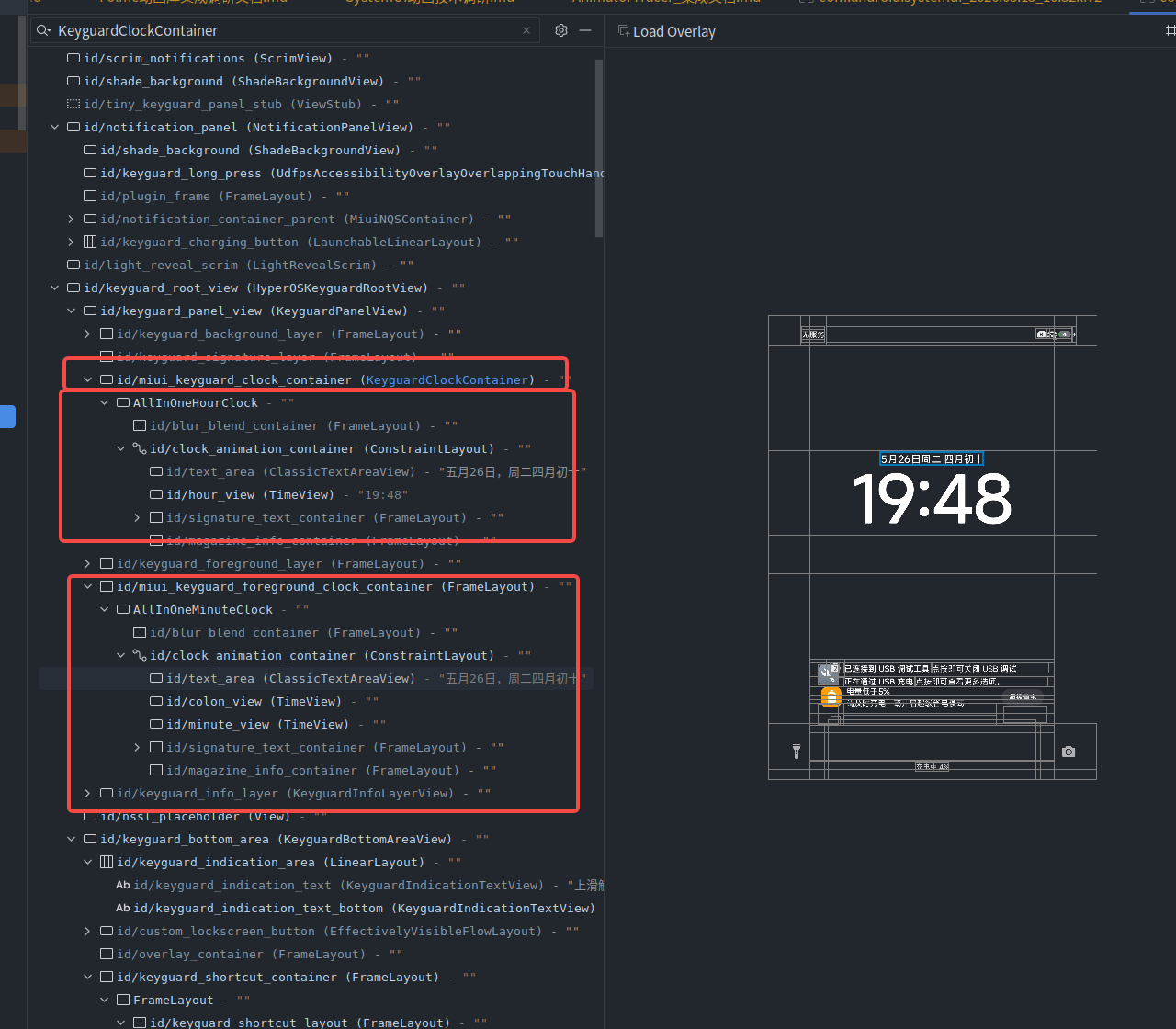
锁屏 AllInOne 时钟控件(AllInOneHourClock + AllInOneMinuteClock)的 MiBlurBlend 玻璃效果触发了离屏渲染 Surface 重建 + 高斯模糊多 Pass 中间缓冲区分配,由于这些 Surface 在帧间被 GPU Resource Cache 回收,每次重绘都需要重新分配 GPU 内存。
根因链
AllInOneHourClock / AllInOneMinuteClock (锁屏时钟)
  ├─ setMiViewBlurMode(3) → 启用 Custom Blur 效果
  │
  ├─ updateOffscreenSurface() [KeyguardClockContainer]
  │     └─ 整个 Clock Container 作为离屏 Layer 重绘
  │         └─ GrResourceAllocator::assign → allocateImageMemory (17MB, 全容器尺寸)
  │
  ├─ 4x updateRenderNodeSurface() [TimeView×3 + ClassicTextAreaView×1]
  │     └─ 每个子 View 创建独立离屏 Surface
  │         └─ 每个 Surface → allocateImageMemory (各~10MB)
  │
  └─ 4x updateCustomBlurImage() → generateLMGaussianBlur()
        ├─ lmDownSampling() → 创建缩小缓冲区 → newOpsTask → allocateImageMemory
        ├─ lmBlur(X) → 水平模糊 Pass → newOpsTask → allocateImageMemory
        ├─ lmBlur(Y) → 垂直模糊 Pass → newOpsTask → allocateImageMemory
        └─ lmUpSampling() → 放大结果 → newOpsTask → allocateImageMemory
3. 详细分析
3.1 帧结构概览
DrawFrames 96187 (3.967ms)
  ├─ syncFrameState (0.380ms)
  │    └─ prepareTree → 遍历 View 树,标记 dirty layers
  ├─ dequeueBuffer (0.013ms)
  └─ Drawing 1672×2364 (3.470ms)
       ├─ renderFrame → renderFrameImpl (1.022ms)
       │    └─ Record phase: 遍历 View 树记录绘制 Op
       │         ├─ KeyguardClockContainer → updateOffscreenSurface
       │         │    └─ AllInOneHourClock → LMGaussian blur (4 passes)
       │         │    └─ TimeView → updateRenderNodeSurface + updateCustomBlurImage
       │         └─ FrameLayout → updateOffscreenSurface
       │              └─ AllInOneMinuteClock
       │                   ├─ ClassicTextAreaView → updateRenderNodeSurface + updateCustomBlurImage
       │                   ├─ TimeView → updateRenderNodeSurface + updateCustomBlurImage
       │                   └─ TimeView → updateRenderNodeSurface + updateCustomBlurImage
       ├─ flush commands → Vulkan finish frame (2.167ms) ← 主要耗时
       │    ├─ GrResourceAllocator::assign × 14 (GPU 纹理分配)
       │    │    └─ allocateImageMemory × 16 (总计 ~62MB)
       │    ├─ OpsTask::onPrepare (准备顶点/uniform)
       │    ├─ Texture upload × 3 (字体纹理)
       │    ├─ OpsTask::onExecute (GPU 提交)
       │    └─ QueueSubmit (0.092ms)
       ├─ waitOnFences (0.003ms)
       └─ queueBuffer (0.225ms)
3.2 控件 → Op → 内存分配映射
| 控件 | 层级路径 | opid | 功能 | 触发的 GPU 内存 | 现状 |
|---|---|---|---|---|---|
| KeyguardClockContainer | KeyguardPanelView > KeyguardClockContainer | 27555 | Container 离屏背景 FillRect | 17MB (全容器) | 建议去掉离屏 |
| AllInOneHourClock 模糊 | → makeContainerMaterial → LMGaussian | 27557-27560 | 高斯模糊 4 Pass | 4×786KB | |
| TimeView (小时) | AllInOneHourClock > TimeView (hour_view) | 27561 | 子 View 离屏渲染 | ~10MB | 已经减小为近半屏 |
| TimeView (小时) 模糊 | → updateCustomBlurImage → useColorModes | 27562-27564 | 颜色混合 + 模糊融合 | 261KB×2 | |
| ClassicTextAreaView | AllInOneMinuteClock > ClassicTextAreaView (text_area) | 27567 | 文本区域离屏渲染 | 175KB (Cache Hit) | 和字体大小一致 |
| ClassicTextAreaView 模糊 | → updateCustomBlurImage | 27568-27569 | 颜色混合 + 模糊融合 | 548KB | |
| TimeView (冒号) | AllInOneMinuteClock > TimeView (colon_view) | 27570 | 子 View 离屏渲染 | ~10MB | 已经减小为近半屏,可以和分钟合并 |
| TimeView (冒号) 模糊 | → updateCustomBlurImage | 27571-27572 | 颜色混合 + 模糊融合 | — | |
| TimeView (分钟) | AllInOneMinuteClock > TimeView (minute_view) | 27573 | 子 View 离屏渲染 | ~10MB | 已经减小为近半屏 |
| TimeView (分钟) 模糊 | → updateCustomBlurImage | 27574-27575 | 颜色混合 + 模糊融合 | — |
⚠️ 勘误 (2026-05-26):原报告将 ClassicTextAreaView 的 GPU 内存标注为 ~10MB,经过 taskId→Interval 精确映射验证,该结论错误。
正确数据:
- opid:27567 → taskId:13572 → Interval 14520
- Interval 14520 在本帧为 Cache Hit(未触发 allocateImageMemory)
- 即使未命中缓存,ClassicTextAreaView 的 Surface 分配也仅为 175,680 bytes (0.17MB)
(在 DrawFrames 96114 中已验证:Interval 14474 → vkAllocateMemory: 175,680 bytes)原因分析:
updateRenderNodeSurface的 Surface 尺寸取决于 View 自身的 RenderNode bounds
(MiBackgroundBlurBlendImpl.cpp:2260:mBounds = SkRect::MakeWH(newRP.getWidth(), newRP.getHeight()))- ClassicTextAreaView 布局为
wrap_content × wrap_content,仅一行文字(~700×60 像素)→ 175KB- TimeView 布局为
0dp × 0dp+ 约束填满容器(~1672×1544 像素)→ 10MB- 两者都启用了
setMiViewBlurMode(3),但 Surface 大小由各自的 View 尺寸决定AllInOneMinuteClock 子 View 布局说明:
- 从 XML 布局
miui_clock_layout_all_in_one_minute.xml确认,AllInOneMinuteClock 中无hour_viewcolon_view(TimeView) — 冒号:,填满容器约束 → ~10MB Surfaceminute_view(TimeView) — 分钟数字,填满容器约束 → ~10MB Surfacetext_area(ClassicTextAreaView) — 日期/天气文本,wrap_content → 175KB Surface结论:真正的 GPU 内存大户是两个 TimeView(冒号和分钟),各占 ~10MB;ClassicTextAreaView 的开销可忽略不计(175KB 且多数帧 Cache Hit)。一个冒号独占一套完整的模糊渲染管线(~10MB),这是明显的资源浪费点。
3.3 大内存分配尺寸分析
| 分配大小 | 像素数 | 推测尺寸 | 对应内容 |
|---|---|---|---|
| 17,839,680 bytes (17MB) | 4,459,920 px | ~2364×1886 (含 extendSize) | KeyguardClockContainer 全容器 + blur 扩展边界 |
| 10,327,616 bytes (10MB) | 2,581,904 px | ~1672×1544 | TimeView 离屏 Surface(colon_view / minute_view / hour_view,填满容器约束) |
| 804,928 bytes (786KB) | 201,232 px | 下采样后的模糊中间缓冲 | LMGaussian downSampled buffer |
| 267,840 bytes (261KB) | 66,960 px | 颜色混合中间缓冲 | useColorModes intermediate |
| 175,680 bytes (175KB) | 43,920 px | ~700×60 | ClassicTextAreaView 离屏 Surface(wrap_content 文本区域) |
3.4 GPU 缓存状态变化
帧开始: use_cache=42.8MB / max_cache=189.7MB (22.5%)
帧结束: use_cache=104.6MB / max_cache=189.7MB (55.1%)
本帧新增: +61.8MB
关键问题:前一帧(96150)结束时缓存也是 22.5%(42.8MB),说明在两帧之间有大量 Surface 被 purge。这些锁屏时钟的离屏 Surface 每隔若干帧就被 GPU 缓存回收,导致下一次绘制时必须重新分配。
对比帧 96114(也有 24 次 allocateImageMemory),其起始缓存仅 5.6%(10.7MB),说明这是一个周期性的冷分配模式。
4. 代码路径
4.1 时钟控件(应用层)
仓库: common_widgets/miuiclock/
-
AllInOneBase.kt:610-612— 为 HourView/MinuteView/ColonView 设置 Glass 效果:mHourView?.let { MiuiBlurUtils.setGlassEffectMethod(it, it.glassData) } mMinuteView?.let { MiuiBlurUtils.setGlassEffectMethod(it, it.glassData) } mColonView?.let { MiuiBlurUtils.setGlassEffectMethod(it, it.glassData) } -
AllInOneBase.kt:1213-1224—updateClockEffectsContainer()设置模糊容器和半径:val blurRadius = if (ClockEffectUtils.isGlassType(effectType)) { AllInOneUtil.getGlassSmallBlurRadius(clockStyleInfo?.glassTransparency ?: 0f) } else { getDimen(R.dimen.miui_eastern_art_c_clock_blur_radius) } updateViewBackgroundBlurContainer(blurContainer, blurRadius, *getEffectChildViews()) -
MiuiBlurUtils.java:529— 容器设置为 blur mode 2:setMiBackgroundBlurMode(container, 2); -
MiuiBlurUtils.java:549— 子 View 设置为 blur mode 3(Custom):setMiViewBlurMode(view, 3);
4.2 模糊渲染(Framework 层)
仓库: venderFrameworkbase/base/libs/hwui/
-
pipeline/skia/MiBackgroundBlurBlendImpl.cpp:1643-1686—updateOffscreenSurface()- 当
mChangeOffscreenOrder && !mLayerDamage->isEmpty()时重新绘制整个离屏层 - 调用
layerCanvas->clear(SK_ColorTRANSPARENT)清空后forceDraw重绘 - 触发
GrResourceAllocator::assign→allocateImageMemory
- 当
-
pipeline/skia/MiBackgroundBlurBlendImpl.cpp:1936-1980—updateRenderNodeSurface()- 当
(mElementMode == 2 || mElementMode == 3) && !mLayerDamage->isEmpty()时 - 将子 View 绘制到
mCustomSurface - 每个子 View 独立一个离屏 Surface → 独立的 GPU 纹理分配
- 当
-
utils/MiBlurBlendUtils.cpp:704-728—generateLMGaussianBlur()- 4 Pass 渲染管线:downSampling → blurX → blurY → upSampling
- 每个 Pass 创建
newOpsTask→ 需要独立的中间渲染目标 - 中间缓冲区尺寸 = 原始尺寸 /
mLMDownSamplingScale(取 64 对齐)
-
pipeline/skia/MiBackgroundBlurBlendImpl.cpp:623-648—makeContainerMaterial()- 容器级模糊背景合成
- 调用
mContainerMaterial->onMakeBackground()生成全容器的模糊图像
4.3 内存分配路径
Skia GPU (Vulkan backend)
  └─ GrResourceAllocator::assign(Interval ID)
       └─ 检查 ScratchKey 缓存(无命中时)
            └─ createTexture → VkCreateImage
                 └─ VulkanAMDMemoryAllocator::allocateImageMemory
                      └─ vkAllocateMemory(size)
                           └─ insertResource(gpuMemorySize, use_cache, UniqueID)
5. 证据链
证据 1: updateRenderNodeSurface 直接触发离屏 Surface 重建
- Trace 数据: 4 个
updateRenderNodeSurfaceslice(ID 307017, 307081, 307114, 307138),各自是TimeView/ClassicTextAreaView的子节点 - 代码路径:
MiBackgroundBlurBlendImpl.cpp:1941— 条件mElementMode == 2 || mElementMode == 3(即 Glass/Custom 模式,由setMiViewBlurMode(view, 3)设置) - 因果逻辑: 当
mLayerDamage非空(即 View 内容有变化),会清空mCustomSurface并重绘,如果 Surface 在帧间被 GPU cache purge,则需要重新allocateImageMemory
证据 2: LMGaussian 多 Pass 创建多个中间渲染目标
- Trace 数据:
LMGaussianslice 内部有 4 个newOpsTask(opid 27557-27560),对应 4 个 FillRectOp - 代码路径:
MiBlurBlendUtils.cpp:721-724— 依次调用lmDownSampling,lmBlur(X),lmBlur(Y),lmUpSampling,每个创建新 Surface - 因果逻辑: 高斯模糊需要多 Pass 分离卷积,每 Pass 需要独立渲染目标,缓存未命中时触发
allocateImageMemory
证据 3: GPU 缓存周期性回收导致冷分配
-
Trace 数据:
- 帧 96150(前一帧)结束缓存: 42.8MB (22.5%)
- 帧 96187 开始缓存: 42.8MB (22.5%) — 未变
- 帧 96187 结束缓存: 104.6MB (55.1%) — 新增 62MB
- 帧 96114(更早)起始缓存仅 10.7MB (5.6%)
-
因果逻辑: 这些大尺寸 Surface(10-17MB)的 UniqueID 在帧间没有命中缓存,说明它们已被
GrResourceCache::purgeUnlockedResources回收。由于缓存上限 189.7MB 而这些 Surface 单个就占 10-17MB,当缓存压力增大时容易被 evict。
证据 4: 问题控件确认为锁屏 AllInOne 时钟
- Trace 数据: View 层级为
KeyguardPanelView > KeyguardClockContainer > AllInOneHourClock > TimeView(hour_view);KeyguardPanelView > FrameLayout > AllInOneMinuteClock > TimeView(colon_view) / TimeView(minute_view) / ClassicTextAreaView(text_area) - 代码路径:
AllInOneBase.kt:610中setGlassEffectMethod为每个子 View 设置模糊效果;MiuiBlurUtils.java:339中setMemberBlendColors对所有 View(含 ClassicTextAreaView)无差别调用setMiViewBlurMode(view, 3) - 因果逻辑: AllInOne 时钟的 Glass 效果要求每个子 View 独立离屏渲染 + 独立模糊管线。其中 TimeView(3 个,layout 填满容器)各占 ~10MB,ClassicTextAreaView(1 个,wrap_content 文本)仅占 175KB。真正的内存大户是 3 个 TimeView。
证据 5: ClassicTextAreaView Surface 尺寸由 View 自身 bounds 决定(非容器尺寸)
- 代码路径:
MiBackgroundBlurBlendImpl.cpp:2260—mBounds = SkRect::MakeWH(newRP.getWidth(), newRP.getHeight());createOrUpdateLayer()使用mBounds创建mCustomSurface,不叠加 extendSize - 布局数据: ClassicTextAreaView XML =
wrap_content × wrap_content+textSize="19dp"→ ~700×60px;TimeView XML =0dp × 0dp+ constraints 填满容器 → ~1672×1544px - Trace 验证: DrawFrames 96114 中 ClassicTextAreaView 的 vkAllocateMemory = 175,680 bytes;TimeView 的 vkAllocateMemory = 10,327,616 bytes。比值 ≈ 1:59,与像素面积比 (700×60)/(1672×1544) ≈ 1:61 吻合
6. 知识总结
6.1 MiBlurBlend 渲染管线(离屏 + 模糊)
AllInOne 时钟的 Glass 效果渲染流程:
-
Container 层(KeyguardClockContainer):
setMiBackgroundBlurMode(container, 2)启用容器级模糊updateOffscreenSurface()→ 整个容器重绘到离屏 LayermakeContainerMaterial()→generateLMGaussianBlur()4-pass 高斯模糊
-
Element 层(每个启用 blur mode 3 的子 View):
setMiViewBlurMode(view, 3)启用 Custom 模糊(对 ALL effectChildViews 无差别应用,含 ClassicTextAreaView)updateRenderNodeSurface()→ 子 View 独立离屏渲染updateCustomBlurImage()→useColorModes()+drawMiBlurBlendCustom()颜色混合- Surface 大小 = View 自身 RenderNode bounds(
MiBackgroundBlurBlendImpl.cpp:2260),不继承容器尺寸
-
内存开销模型(修正后):
- 每个容器: 1×全尺寸 Surface (17MB) + 4×模糊中间缓冲 (4×786KB)
- TimeView (layout 填满容器): 1×~10MB Surface + 2-3×模糊/混合中间缓冲
- ClassicTextAreaView (wrap_content): 1×175KB Surface + 模糊中间缓冲(极小)
- 本例实际内存大户: 2×Container(17MB) + 3×TimeView(10MB) = ~64MB;ClassicTextAreaView 贡献可忽略
6.2 allocateImageMemory 触发条件
只有当 GrResourceAllocator::assign 在 GPU 资源缓存中未找到匹配的 ScratchKey 时,才会触发 allocateImageMemory。缓存未命中的原因:
- 首次绘制(冷启动)— 缓存中从未有过该尺寸的纹理
- 缓存 purge 后重绘 — 大纹理被
purgeUnlockedResources回收(本例的主因) - 尺寸变化 — View 大小改变导致 ScratchKey 不匹配
6.3 关键数字
- AllInOne 时钟帧 GPU 内存开销: ~62MB(含缓存新增)
- Container Surface: ~17MB(2364×1886×RGBA,含 extendSize 扩展边界)
- TimeView Surface: ~10MB(~1672×1544×RGBA,layout 填满容器约束)
- ClassicTextAreaView Surface: ~175KB(~700×60×RGBA,wrap_content 文本区域)
- LMGaussian 中间缓冲: ~786KB×4
- 帧耗时中 Vulkan finish frame 占比: 54.6%(2.167ms / 3.967ms)
- 最慢单次 allocateImageMemory: 0.346ms(Interval 14527, 17MB)
- 内存分配主要贡献者: 2×Container(34MB) + 3×TimeView(30MB) = 64MB (占比 97%+)
7. 优化建议
- 减少离屏 Surface 数量 — 冒号 colon_view 独占一套 10MB 模糊管线极度浪费,考虑将冒号合入 minute_view 文本或排除其 blur 效果
- 延长 GPU 缓存保留时间 — 为锁屏时钟的 Surface 提升缓存优先级,避免帧间被 purge
- 降低模糊分辨率 — 增大
mLMDownSamplingScale减小中间缓冲区尺寸 - 共享模糊结果 — 同一容器内的子 View 可共享容器级模糊背景,无需每个独立计算
- 条件性触发 — 当时钟内容未变化时(非秒级更新),跳过
updateRenderNodeSurface,保持上一帧的mCustomImage