非联动亮灭屏丢帧分析:KeyguardClockContainer alpha 残留导致全屏离屏渲染
问题现象
锁屏亮屏场景,Perfetto trace 中观察到 RenderThread 的 GPU 耗时偏长:
waiting for GPU completion平均 5.10ms,峰值 10.55msDrawFrames峰值 7.21ms,逼近 120Hz 的 8.33ms deadline- Trace 中
alpha caused saveLayer 1080x2400出现 167 次(几乎每帧 2 次全屏离屏渲染)
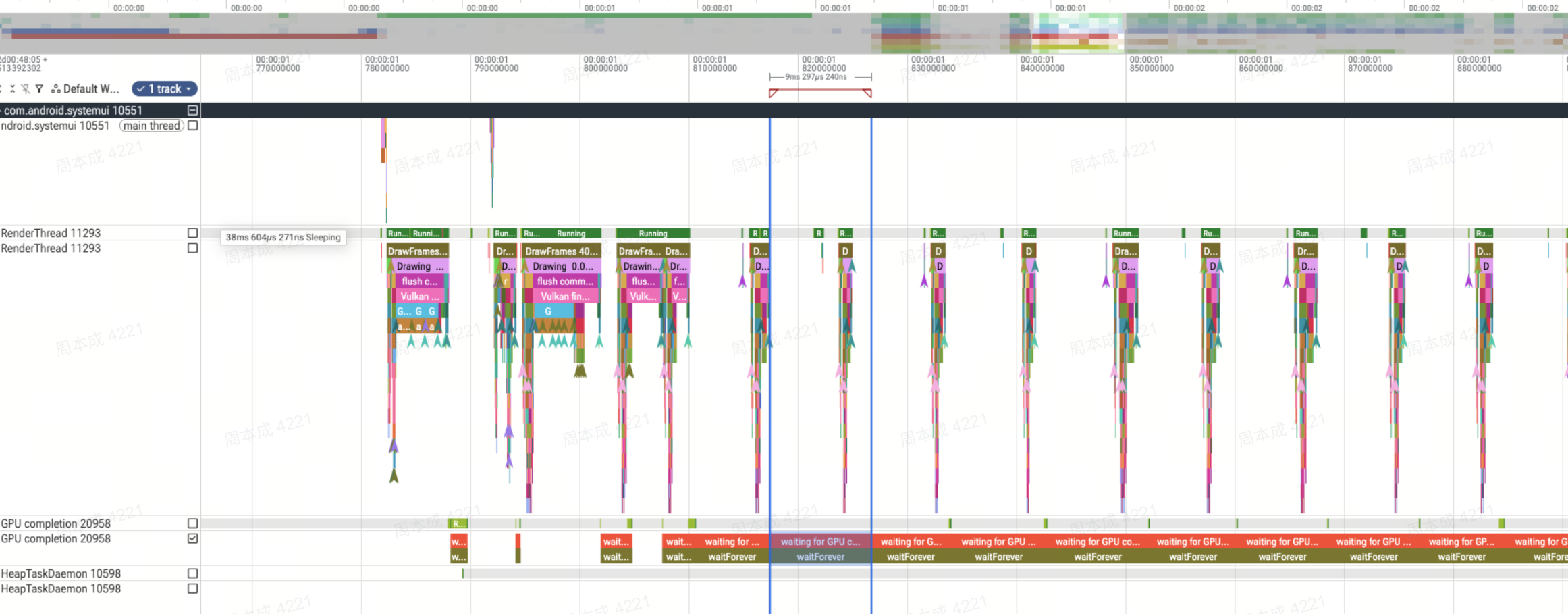
哪个 View 触发了离屏
Trace 中搜索 alpha caused saveLayer,发现 169 次全屏离屏渲染,来源:
| View | saveLayer 次数 | 尺寸 | 内容 |
|---|---|---|---|
| KeyguardClockContainer | 85 次 | 1080x2400 | AllInOneHourClock(小时+高斯模糊) |
| FrameLayout (SecondaryClockContainer) | 84 次 | 1080x2400 | AllInOneMinuteClock(分钟+日期) |
两个容器都是 match_parent(1080x2400 全屏),但实际时钟内容只有 1080x1348。分配 2 个 10.1MB 全屏离屏 buffer,加上模糊效果的 3 个中间 target(~5.8MB × 3),单帧显存分配约 38MB。
单帧 GPU 开销拆解(DrawFrames 24446)
allocateImageMemory 10 次:
├── [1-4] 小纹理命中缓存(~0ms)
├── [5] saveLayer buffer — KeyguardClockContainer 1080x2400  → 0.619ms
├── [6] saveLayer buffer — SecondaryClockContainer 1080x2400 → 0.832ms
├── [7] 小纹理(~0ms)
├── [8] 高斯模糊中间 target (generateLMGaussianBlur)       → 0.462ms
├── [9] 高斯模糊中间 target (drawMiGlassCustom)            → 0.482ms
└── [10] 高斯模糊中间 target (drawMiBlurBlendCustom)       → 0.802ms

大块分配总耗时: 3.2ms(占 DrawFrames 6.44ms 的 50%)
saveLayer 不仅自身分配离屏 buffer,还导致模糊效果缓存失效 → 连锁触发 3 次模糊 target 重新分配。
为什么会离屏
触发条件
HWUI 在 View.draw() 中的判断逻辑:
if (alpha < 1.0f && hasOverlappingRendering() == true)
    → canvas.saveLayerAlpha(bounds, alpha)  // 创建离屏 buffer
为什么 alpha < 1.0
亮屏时 KeyguardClockInjector.startWakeupAnim() 对两个容器执行了 startAnimation:
// KeyguardClockInjector.kt 第 249-259 行
fun startWakeupAnim(translationY: Float, listener: AnimationListener?) {
    val mainContainer = getView()           // KeyguardClockContainer
    val secondContainer = getSecondaryClockLayerView()  // FrameLayout

    mainContainer?.startAnimation(generalWakeupTranslateAnimation(translationY, listener))
    secondContainer?.startAnimation(generalWakeupTranslateAnimation(translationY))
}
动画使用 AlphaAnimation(0f, 1f) + SpringInterpolator(0.95, 0.8571)。
关键:
startAnimation使用旧版 Animation 框架,alpha 通过Transformation临时注入,不经过View.setAlpha()。每帧View.draw()时从 Transformation 取出 alpha 值,作为局部变量传给saveLayerAlpha(),用完即弃,不写回 View。因此View.getAlpha()始终返回 1.0,但渲染时实际 alpha < 1.0。
为什么整个动画过程都触发(而不只是最后几帧)
AlphaAnimation(0f, 1f) 意味着动画从 alpha=0 到 alpha≈1,全程 alpha < 1.0,每帧都满足 saveLayer 触发条件。Frida Hook 验证:
[ClockAlpha] AlphaAnimation alpha=0.9522857070
[ClockAlpha] AlphaAnimation alpha=0.9560980797
...
[ClockAlpha] AlphaAnimation alpha=0.9947436452
(永远到不了精确 1.0 — SpringInterpolator 数学特性)
完整调用链
亮屏 → KeyguardPanelViewController.onDisplayStateOn()
  → KeyguardClockInjector.startWakeupAnim()
    → container.startAnimation(AnimationSet[AlphaAnimation + TranslateAnimation])

每帧 Choreographer 回调 → View.draw(canvas, parent, drawingTime):
  ① applyLegacyAnimation()
     → Animation.getTransformation(time, transformation)
       → AlphaAnimation.applyTransformation(interpolatedTime, t)
         → SpringInterpolator.getInterpolation(input)
           = e^(r*input) * (c1*cos + c2*sin) + 1.0 = 0.95~0.9999(≠ 1.0)
         → t.setAlpha(interpolatedTime) → 0.9523

  ② float alpha = getAlpha()            → 1.0(View 自身属性)
     float transformAlpha = t.getAlpha() → 0.9523(Animation 临时值)
     alpha *= transformAlpha             → 0.9523(局部变量)

  ③ if (alpha < 1.0f)                   → true
       if (hasOverlappingRendering())    → true(默认)
         canvas.saveLayerAlpha(0, 0, 1080, 2400, 242)
           → 分配 10.1MB 离屏 buffer
           → 模糊缓存失效 → 重新分配 3 个模糊 target

  ④ dispatchDraw() → 子 View 画到离屏 buffer
  ⑤ canvas.restore() → 离屏 buffer 以 alpha 合成回主 buffer
优化方案
方案一:hasOverlappingRendering = false
// KeyguardClockContainer.kt
override fun hasOverlappingRendering(): Boolean = false

// KeyguardClockContainer.kt onPanelViewAttachedToWindow 中
mKeyguardSecondaryClockContainer?.setHasOverlappingRendering(false)原理:View.draw() 中,当 Animation alpha < 1.0 时的判断逻辑:
if (alpha < 1.0f) {
    if (hasOverlappingRendering()) {
        → canvas.saveLayerAlpha(bounds, alpha)  // 创建离屏 buffer,保证重叠区域透明度正确
    } else {
        → 逐子 View 直接乘 alpha 绘制(无离屏)
    }
}
返回 false 告诉框架”子 View 无视觉重叠,不需要离屏保证透明度一致性”。
Frida 验证结果:
| 指标 | 修复前 | 修复后 |
|---|---|---|
| saveLayer 次数 | 167 | 0 |
| GPU completion 平均 | 5.10ms | ~1.9ms (-63%) |
| GPU completion 最大 | 10.55ms | ~5.4ms (-49%) |
风险评估:
“重叠”是指两个子 View 在同一像素位置都有非透明内容。如果 hasOverlappingRendering=false 但实际有重叠,重叠区域会被叠加两次 alpha,视觉上比预期偏暗。
KeyguardClockContainer 子 View 结构(renderFrame 确认):
KeyguardClockContainer (1080x2400)
└── AllInOneHourClock (1080x1348)
    ├── FrameLayout — 高斯模糊背景 (generateLMGaussianBlur)
    └── ConstraintLayout — 时间数字 (TimeView + drawMiGlassCustom 毛玻璃)
文字叠加在模糊背景上 → 存在重叠。当 alpha < 1.0 时:
- 有 saveLayer(正确):A 和 B 正常混合后整体 × alpha
- 无 saveLayer:A × alpha 先画,B × alpha 覆盖 → 如果 B 有半透明(毛玻璃),模糊背景颜色会”透”过来更多
| 风险场景 | alpha 状态 | 持续时间 | 视觉影响 |
|---|---|---|---|
| 亮屏动画 | 0→1(700ms) | 短暂动态 | 动画过程中难以察觉 |
| setMagazineAlpha 画报切换 | 0~1 | 可能数百ms | 如果长时间中间 alpha,可能有可感知差异 |
| checkUpdateClockAlpha 遮挡过渡 | 0~1 | 短暂 | 风险低 |
| 未来功能设置中间 alpha | 未知 | 未知 | 不可预见 |
方案二:缩小尺寸 + 缩短时间 + 终值校正(组合优化)
不改 hasOverlappingRendering,通过减少离屏帧数和尺寸来降低 GPU 开销。
2a. 动画下移到子 View(缩小离屏尺寸)
当前动画在 KeyguardClockContainer(1080×2400)上,但实际内容 AllInOneHourClock 只有 1080×1348。把 startAnimation 下移到子 View:
// KeyguardClockInjector.kt - startWakeupAnim
override fun startWakeupAnim(translationY: Float, listener: AnimationListener?) {
    val mainContainer = getView()
    val secondContainer = getSecondaryClockLayerView()

    // 动画下移到实际内容 View
    val hourClock = mainContainer?.getChildAt(0)   // AllInOneHourClock 1080x1348
    val minuteClock = secondContainer?.getChildAt(0) // AllInOneMinuteClock

    hourClock?.startAnimation(generalWakeupTranslateAnimation(translationY, wakeupAnimListener))
    minuteClock?.startAnimation(generalWakeupTranslateAnimation(translationY))
}
效果:saveLayer 从 1080×2400 (10.1MB) → 1080×1348 (5.7MB),GPU 像素处理量 -44%。
注意:TranslateAnimation 的偏移量需根据子 View 坐标系调整。
2b. 缩短动画 duration(减少离屏帧数)
// MiuiAnimationUtils.kt
set.duration = 500  // 700 → 500(缩短 30%)
离屏帧数从 ~84帧降到 ~60帧。需 UX 确认动画流畅性。
2c. SpringInterpolator 阈值截断 + 终值校正
SpringInterpolator 的特性是接近终值时变化极慢(最后 200ms 从 0.99 到 0.9999),视觉上无法分辨但仍触发全屏离屏。截断尾部:
// SpringInterpolator.java
public float getInterpolation(float input) {
    if (input >= 1.0f) return 1.0f;  // 终值校正
    float result = (float)(
        Math.pow(Math.E, r * input) * (c1 * Math.cos(w * input) + c2 * Math.sin(w * input)) + 1.0f);
    if (result > 0.99f) return 1.0f;  // 阈值截断:alpha > 0.99 直接归 1
    return result;
}
效果:最后 ~150ms 的帧不再触发 saveLayer,肉眼无法分辨 0.99 和 1.0 的差异。
方案二组合效果
| 优化手段 | 效果 | 风险 |
|---|---|---|
| 动画下移到子 View | saveLayer 尺寸 -44% | TranslateY 需调整坐标系 |
| duration 700→500ms | 离屏帧数 -30% | UX 确认动画节奏 |
| 阈值截断 >0.99→1.0 | 尾部 ~150ms 不再离屏 | 尾部可能有轻微突变 |
| 终值校正 input≥1→1.0 | 消除动画结束后残留 | 无 |
原始:    84帧 × 1080×2400 × 2容器 = 每帧 20.2MB 离屏
优化后:  ~35帧 × 1080×1348 × 2容器 = 每帧 11.4MB 离屏

GPU 总离屏负载: 1697MB → 399MB(-76%)
两大方案对比
| 方案一 hasOverlappingRendering=false | 方案二 组合优化 | |
|---|---|---|
| saveLayer | 完全消除 | 减少 76% |
| GPU 开销降低 | -63% | ~-50% |
| 改动量 | 2 行 | ~15 行 |
| 视觉风险 | 毛玻璃重叠区域可能偏暗 | 动画略快 + 尾部截断 |
| 适用场景 | 子 View 无半透明重叠或可接受差异 | 方案一风险不可接受时的退路 |
推荐:优先尝试方案一(改动最小、效果最好)。如果 UX 评审认为毛玻璃效果差异不可接受,退而使用方案二组合优化。两者也可叠加使用——方案一消除离屏 + 方案二的终值校正防御残留。